aislop
Catch the slop AI coding agents leave in your code.








The patterns Claude Code, Cursor, Codex, and OpenCode leave behind: narrative comments above self-explanatory code, swallowed exceptions, hidden fallbacks, as any casts, hallucinated imports, duplicated helpers, dead code, todo stubs, oversized functions. Tests pass. Lint passes. The code rots anyway.
aislop catches them. 50+ rules across 10 language targets (TypeScript, JavaScript, Expo / React Native, Python, Go, Rust, Ruby, PHP, C#, C/C++). Scores every change 0–100. Sub-second. Deterministic: no LLM in the runtime path, same code in, same score out. MIT-licensed, free CLI.
Quick start
npx aislop@latest scan
No install needed. Works on any project. Get your score in seconds.
Also available on npm, Yarn, Bun, Homebrew, and PyPI:
npm install -g aislop                # npm
yarn dlx aislop scan                 # Yarn (no install)
bun add -g aislop                    # Bun
brew install scanaislop/tap/aislop   # Homebrew
pipx install aislop                  # Python
See Installation for every option.
Language support
aislop supports TypeScript, JavaScript, Expo / React Native, Python, Go, Rust, Ruby, PHP, C#, and C/C++.
Coverage includes formatting, linting, complexity, AI-slop detection, and security checks. Some checks use optional system tools; see Installation and the rules reference for details.
aislop agent                 # repair with your coding agent (Codex/Claude/OpenCode)
aislop fix                   # auto-fix the mechanical issues
aislop fix -f                # aggressive fixes (deps, unused files)
aislop ci                    # CI mode (JSON + gate)
aislop hook install --claude # per-edit hook
Public badge: Show your score on your README
[](https://scanaislop.com)
Run npx aislop@latest badge to auto-generate. Free at scanaislop.com.
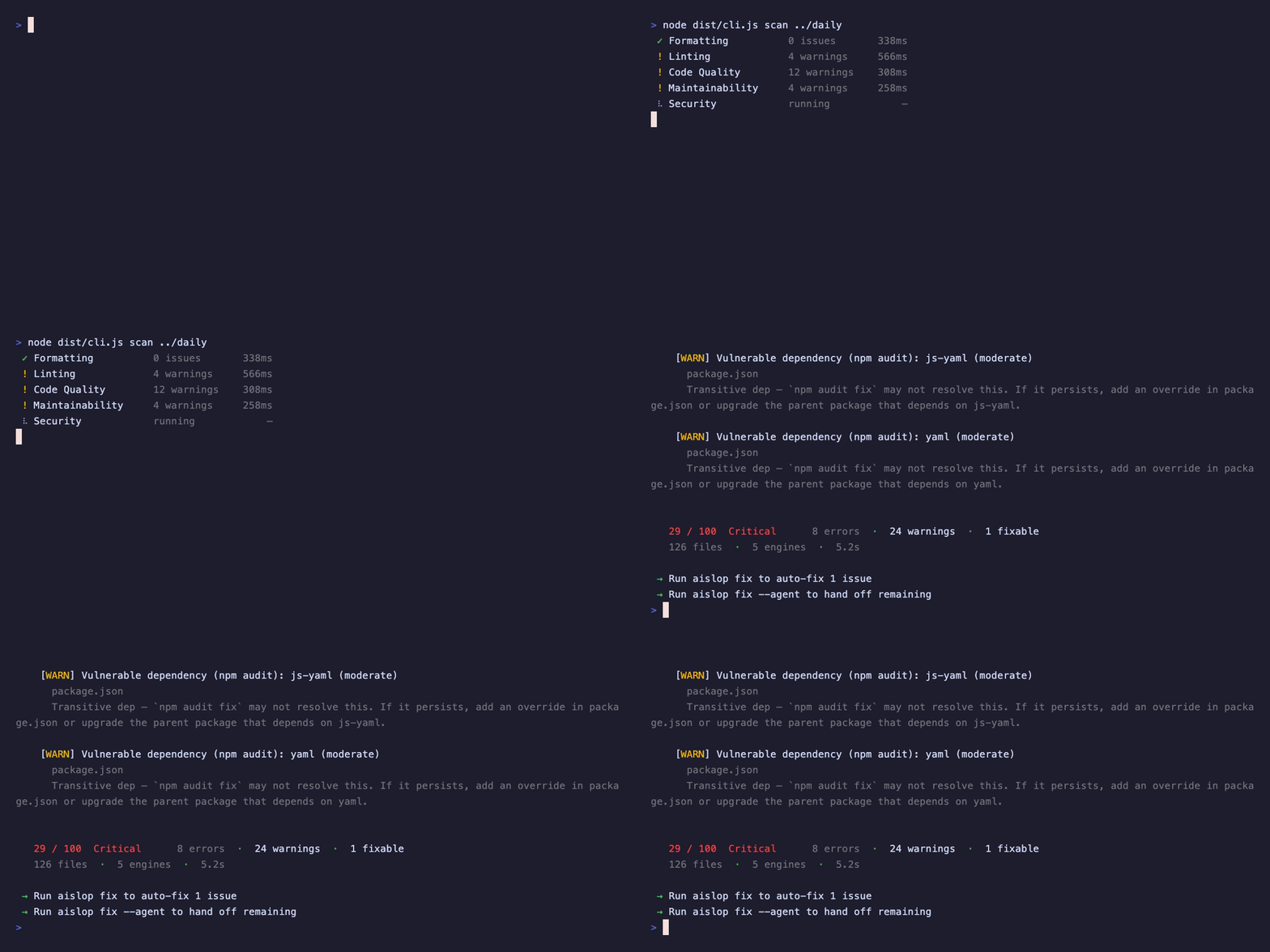
See it in action
Scan
Installation
The same CLI is published to npm, Homebrew, and PyPI. Pick whichever fits your stack.
Node / npm
# Run without installing
npx aislop@latest scan

# npm
npm install --save-dev aislop

# yarn
yarn add --dev aislop

# pnpm
pnpm add -D aislop

# bun
bun add -d aislop

# Global
npm install -g aislop
Also available as @scanaislop/aislop on GitHub Packages.
Package installation does not run dependency lifecycle scripts. After installing, run aislop-tools once if you want bundled Ruff and golangci-lint coverage; the core scanner works without it.
Homebrew (macOS / Linux)
brew install scanaislop/tap/aislop
Homebrew installs Node.js as a dependency if it isn't already present. Details: homebrew-tap.
Python / pipx
pipx install aislop
pipx keeps aislop in its own isolated environment. Needs Node.js on PATH. Details: PyPI package.
Full reference for every channel, optional bundled tooling, and external tools: docs/installation.md.
Usage
Examples below use the installed aislop binary. For a one-off latest run, prefix the command with npx aislop@latest, for example npx aislop@latest scan.
Command reference
aislop --help              # clean overview
aislop commands            # every public command and major flag
aislop <command> --help    # detailed help for one command
aislop version             # installed version
aislop -V                  # installed version
aislop update              # current and latest npm versions
Scan
aislop scan                       # current directory
aislop scan ./src                 # specific directory
aislop scan --changes             # changed files from HEAD
aislop scan --changes --base origin/main  # changed vs a base branch (PRs)
aislop scan --staged              # staged files only
aislop scan -d                    # verbose file/rule detail
aislop scan --json                # JSON output
aislop scan --sarif               # SARIF 2.1.0 output (GitHub code scanning)
aislop scan --format json         # alternate JSON form
aislop scan --include "src/**"    # only matching paths
aislop scan --exclude "dist,gen"  # skip extra paths
Exclude files: node_modules, .git, dist, build, coverage excluded by default. Add more in .aislop/config.yml:
exclude:
  - "**/*.test.ts"
  - src/generated
Or via CLI: aislop scan --exclude "**/*.test.ts,dist"
Unsupported languages: aislop only analyses the 10 language targets above. If a repo is mostly something else (Swift, Kotlin, Java, …), scoring a handful of incidental files would misrepresent it, so aislop withholds the score and says so rather than printing a number off code it never read. --json returns score: null, scoreable: false, and a coverage breakdown.
Per-rule severity: Override the severity of any rule by id, or turn it off:
# .aislop/config.yml
rules:
  ai-slop/narrative-comment: warning   # error | warning | off
  ai-slop/trivial-comment: "off"       # drop this rule entirely
  security/hardcoded-secret: error
off drops matching diagnostics; error/warning rewrites severity before scoring and reporting. Absent map keeps default behavior.
Suppress findings inline: Silence a specific line when you know better, with an optional reason after --:
// aislop-ignore-next-line ai-slop/hidden-fallback -- options is validated upstream
const opts = { ...defaults, ...(input || {}) };

const legacy = doThing(); // aislop-ignore-line
aislop-ignore-next-line covers the line below, aislop-ignore-line the line it sits on, and aislop-ignore-file (place anywhere in the file) the whole file. Name one or more rules to scope the suppression, or omit them to silence every rule on that line. The directive works in any comment syntax (//, #, ``). Suppressed findings are removed before scoring, and the run reports how many were silenced.
Ignore whole paths: Add an .aislopignore at the project root (same glob semantics as exclude, # comments allowed):
src/generated
**/*.snap
legacy
Extend config: Project config can extend a parent:
# .aislop/config.yml
extends: ../../.aislop/base.yml
ci:
  failBelow: 80             # override specific keys
Editor validation: Point your editor at the JSON Schema in schema/aislop.config.schema.json for autocomplete and validation of .aislop/config.yml. Regenerate it from the source config schema with pnpm gen:schema.
Fix
The deterministic layer beneath aislop agent: auto-fix what's purely mechanical (formatters, unused imports, dead code). For anything that needs judgement, reach for aislop agent or hand off to your coding agent with full diagnostic info.
aislop fix                 # auto-fixes
aislop fix --dry-run       # preview planned steps without writing files
aislop fix --changes       # only rewrite files changed vs HEAD
aislop fix --staged        # only rewrite staged files
aislop fix -d              # detailed fix progress
aislop fix --safe          # only reversible fixes (imports, comment removal, safe formatters)
aislop fix -f              # aggressive: deps, unused files
aislop fix -p              # print an agent handoff prompt
--safe restricts the run to fixes that cannot change behaviour — unused-import removal, import merging, narrative-comment removal, and formatter runs that do not execute project-controlled configuration. Anything that deletes code, rewrites behaviour/attributes, or can load executable formatter configuration (console/dead-code removal, lint autofixes, Ruby/PHP formatter config, unused-declaration and dependency pruning) is skipped, so a --safe run is genuinely "apply and commit".
Run a local repair agent
aislop agent keeps the deterministic scanner in charge while using the coding agent you already have installed. It creates a local git worktree, runs safe fixes, streams a headless Codex / Claude Code / OpenCode repair session, verifies the result with aislop scan --json, writes a local session transcript, and leaves the diff for review.
aislop agent providers        # see installed providers and setup hints
aislop agent connect codex    # run the provider's own local login flow
aislop agent use codex        # save a repo-local default provider
aislop agent use auto         # clear the default and auto-detect
aislop agent plan             # preview provider, worktree, findings, PR/apply behavior
aislop agent monitor          # stream scans when local git changes settle
aislop agent monitor --background
aislop agent monitor list     # list background monitors
aislop agent monitor stop     # stop the latest background monitor
aislop agent monitor --repair --in-place
aislop agent                  # auto-pick an installed provider
aislop agent --provider codex # switch provider
aislop agent --background     # run locally in the background
aislop agent --apply          # apply verified diff back to this repo
aislop agent --pr             # commit, push, and open a draft PR
aislop agent sessions         # list recent local repair sessions
aislop agent show             # show the latest session timeline and summary
aislop agent apply            # apply a reviewed worktree session later
aislop agent watch            # stream the latest session transcript
aislop agent stop             # stop the latest running background session
No OpenAI or Anthropic API key is requested by aislop; provider CLIs use their own existing local auth. A saved provider default lives in .aislop/agent/provider.json and is kept out of commits through the repo's local Git exclude. Session transcripts live under .aislop/agent/sessions/, and agent sessions/worktrees are also excluded locally. Provider JSONL is normalized in the terminal stream while raw lines stay in the transcript.
Hand off to agent
When auto-fix can't solve it, pass the remaining issues to your coding agent with full context:
aislop fix --claude        # Claude Code
aislop fix --codex         # Codex CLI
aislop fix --cursor        # Cursor (copies to clipboard)
aislop fix --gemini        # Gemini CLI
aislop fix --prompt        # print prompt (agent-agnostic)
Other fix handoff flags: --windsurf, --vscode, --amp, --antigravity, --deep-agents, --kimi, --opencode, --warp, --aider, --goose, --pi, --crush.
Install hook
Runs after every agent edit. Feedback flows back immediately.
aislop hook install --claude           # Claude Code
aislop hook install --cursor           # Cursor
aislop hook install --gemini           # Gemini CLI
aislop hook install --pi               # pi
aislop hook install                    # pick agents interactively
aislop hook install claude cursor      # specific agents
aislop hook install --agent claude,pi  # comma-separated agents
aislop install claude cursor           # alias for hook install
aislop install hooks --claude          # natural alias for hook install
Runtime adapters (scan + feedback): claude, cursor, gemini, pi.
Rules-only (agent reads rules): codex, windsurf, cline, kilocode, antigravity, copilot.
Hook install flags: --agent , -g, --global, --project, --dry-run, --yes, --quality-gate, plus per-agent shortcuts --claude, --cursor, --gemini, --pi, --codex, --windsurf, --cline, --kilocode, --antigravity, --copilot.
Quality-gate mode: Blocks if score regresses below baseline.
aislop hook install --claude --quality-gate
aislop hook baseline                    # re-capture baseline
aislop hook status                      # list installed
aislop hook uninstall --claude          # remove
aislop uninstall claude                  # alias for hook uninstall
aislop uninstall hooks --claude          # natural alias for hook uninstall
Docs: /docs/hooks
MCP server
Expose aislop as MCP tools for Claude Desktop, Cursor, Codex:
// ~/.cursor/mcp.json or Claude Desktop config
{
  "mcpServers": {
    "aislop": {
      "command": "npx",
      "args": ["-y", "aislop-mcp"]
    }
  }
}
Tools: aislop_scan, aislop_fix, aislop_why, aislop_baseline
CI
aislop ci                  # JSON output, exits 1 if score < threshold
aislop ci --changes --base origin/main  # gate only the files a PR changes
aislop ci --human          # human-friendly CI output
aislop ci --sarif          # SARIF output for code scanning
ci accepts the same --changes / --staged / --base scoping as scan. Use --changes --base origin/ to gate a pull request on only the files it touches; the score gate and exit code still apply.
Other commands
aislop                         # interactive menu
aislop init                    # create .aislop/config.yml
aislop init --strict           # enterprise-grade gate: all engines, typecheck, failBelow 85
aislop doctor                  # check which engines can run here
aislop rules                   # list rules with severity, fixability, and score impact
aislop rules --search          # searchable rule explorer
aislop badge                   # print badge URL
aislop badge --owner o --repo r --json
aislop trend                   # show score history over time
aislop trends                  # alias for trend
aislop trend --limit 20
aislop update                  # show current and latest npm versions
aislop upgrade                 # alias for update
aislop commands                # full command list
Score history: a normal (full-project, interactive) scan appends a compact record to .aislop/history.jsonl (timestamp, score, error/warning counts, file count, CLI version). aislop trend and aislop trends read it and print a relative-time table plus an ASCII sparkline of recent scores. History is a local side effect only: it is never written for --json/--sarif output, in CI, or when AISLOP_NO_HISTORY=1 is set, so machine output stays clean.
Docs: commands
CI integration
Pre-commit
Run directly on staged files:
aislop scan --staged
Or wire it into the pre-commit framework via the bundled hook:
# .pre-commit-config.yaml
repos:
  - repo: https://github.com/scanaislop/aislop
    rev: v1
    hooks:
      - id: aislop
GitHub Actions
Run aislop init and accept the workflow prompt, or add manually. The self-contained form always runs the latest CLI, so there's nothing to bump:
name: aislop

on:
  pull_request:
  push:
    branches: [main]

jobs:
  quality-gate:
    runs-on: ubuntu-latest
    steps:
      - uses: actions/checkout@v4
      - uses: actions/setup-node@v4
        with:
          node-version: 24
      - run: npx --yes aislop@latest ci
Prefer the Marketplace Action? @v1 tracks the latest release and version: latest keeps the CLI current. Pin @v0.11.0 and a version for reproducible builds:
- uses: actions/checkout@v4
- uses: scanaislop/aislop@v1
  with:
    version: latest
GitHub code scanning (SARIF): emit a SARIF 2.1.0 report and upload it so findings appear in the Security tab:
- run: npx aislop@latest scan . --sarif > aislop.sarif
- uses: github/codeql-action/upload-sarif@v3
  with:
    sarif_file: aislop.sarif
Bitbucket Pipelines
Bitbucket clones shallow by default, so fetch the PR target branch and gate on only the changed files with ci --changes --base:
# bitbucket-pipelines.yml
pipelines:
  pull-requests:
    "**":
      - step:
          name: aislop gate
          image: node:24
          clone:
            depth: full   # branch diffs need history
          script:
            - git fetch origin "$BITBUCKET_PR_DESTINATION_BRANCH"
            - npx --yes aislop@latest ci --changes --base FETCH_HEAD
ci applies the score gate and exit code, so no JSON parsing or hand-rolled threshold is needed. More providers: CI/CD.
Quality gate
Set minimum score in .aislop/config.yml:
ci:
  failBelow: 70
aislop ci exits 1 when score < threshold. Docs: CI/CD
For teams
scanaislop is the hosted platform for teams:
- PR gates with score thresholds
- Standards hierarchy (org → team → project)
- Dashboards and agent attribution
- Visual rules manager
Same engines, same scores. CLI is MIT-licensed. Learn more →
Why aislop
AI coding tools generate code that compiles and passes tests but ships with patterns no engineer would write. aislop gives you one score, one gate, and auto-fixes what it can.
- One score: 0-100, enforced in CI. Weighted so sloppy patterns hit harder than style noise.
- Auto-fix first: Clears formatters, unused imports, dead code mechanically. Hands off the rest to your agent with full context.
- Deterministic: Regex + AST + standard tooling. No LLMs, no API calls. Same code in, same score out.
- Zero-config start:
npx aislop@latest scanworks on any repo. Add.aislop/config.ymlto tune.
What it catches
Six deterministic engines run in parallel:
| Engine | What it checks | How |
|---|---|---|
| Formatting | Code style consistency | Biome, ruff, gofmt, cargo fmt, rubocop, php-cs-fixer, dotnet format, clang-format |
| Linting | Language-specific issues | oxlint, ruff, golangci-lint, clippy, expo-doctor, Roslynator, JetBrains InspectCode, cppcheck, clang-tidy |
| Code Quality | Complexity and dead code | Function/file size limits, deep nesting, unused files/deps (knip), AST-based unused-declaration removal |
| AI Slop | AI-authored code patterns | Narrative comments, trivial comments, dead patterns, unused imports, as any, console.log leftovers, TODO stubs, generic names |
| Security | Vulnerabilities and risky code | eval, innerHTML, SQL/shell injection, dependency audits for JavaScript, Python, Rust, Go, and .NET |
| Architecture | Structural rules (opt-in) | Custom import bans, layering rules, required patterns |
See the full rules reference.
Research
aislop rules are shaped by public scans and benchmark-derived failure modes, not only local fixtures. The research program defines how to run repeatable open-source scans: pin the cohort, store raw JSON, classify findings, fix noisy rules with regression tests, and publish the limits.
Docs
Installation · Commands · Rules · Config · Scoring · CI/CD · Telemetry · Research program
Community
Discord for community chat and support · Discussions for questions, rule requests, and false-positive triage · Issues for bugs
Contributing
See CONTRIBUTING.md. AI assistants: AGENTS.md.
Acknowledgments
Built on: Biome, oxlint, knip, ruff, golangci-lint, expo-doctor
Contributors
Auto-updated by .github/workflows/contributors.yml. Link commit email or add to .github/contributors-overrides.json.