AICON (ai-moive-studio) is an open-source, self-hostable AI video creation workbench that turns script-to-video production into an editable workflow of text, image and video nodes on an infinite canvas, driven by a natural-language assistant, for creators who want the whole pipeline from script breakdown to distribution instead of a single prompt box.
What it is
AICON is a Python project, licensed under Apache License 2.0, that organizes AI video creation as a graph rather than a chat turn. A natural-language assistant works on an infinite canvas, creating nodes and connections between text, image and video material, so a production stays editable and inspectable at every step. It ships as a self-hosted application: the README documents Docker and Docker Compose v2 deployment, with a hosted demo available at aicon-studio.com.
The concrete problem it solves is the single-input-box model of AI video generation, where a prompt produces a clip that cannot be reorganized, re-referenced or continued. AICON replaces that with a chain: script breakdown into characters, scenes and shots; character reference images, keyframes and transition videos; chapter-level images, voice and subtitles assembled into commentary videos; and finally video composition with distribution to Bilibili. The project lives in the Python and Docker self-hosting ecosystem, and sits alongside model providers rather than bundling them — model calls are billed by whichever provider the operator configures.
Key capabilities
- Script-to-storyboard breakdown that extracts characters, scenes and shots, then generates character reference images, keyframes and transition videos.
- Infinite canvas that connects text, image and video nodes into one editable graph.
- Natural-language canvas assistant that creates nodes and connections; generation tasks are triggered manually by the operator.
- Per-chapter illustrated content: images, synthesized voice and subtitles combined into commentary videos.
- Asset and history management for generated material and reference assets, with video composition and Bilibili distribution.
- Provider-agnostic model configuration through the built-in "API 密钥管理" panel, supporting custom OpenAI-compatible endpoints with your own API Key and Base URL.
- Docker Compose v2 deployment via
docker-compose.prod.yml and an .env.production file.
Who uses it and how
- Creators and small studios turning existing prose or scripts into storyboarded video, using the canvas to keep characters and shots consistent across a long piece.
- Self-hosters who run their own infrastructure and want the creation graph on their own hardware rather than inside a vendor account.
- Producers distributing finished work to Bilibili, using the built-in composition and publishing path instead of exporting to separate tools.
- Teams without GPU capacity, who point the workbench at hosted model APIs — the README's sponsored route is MiniMax H3 through the 秘塔科技 API, OpenAI-protocol compatible and also usable from ComfyUI.
- Developers extending the system; the repository separates
frontend/README.md and backend/README.md, with a user guide, model configuration guide and changelog in Chinese.
Getting started
Clone the repository, copy .env.production.example to .env.production and fill in the database, Redis, JWT and MinIO settings, then run docker compose --env-file .env.production -f docker-compose.prod.yml up -d and open http://localhost to register model credentials. A hosted trial is also offered at aicon-studio.com for anyone who wants to evaluate before deploying.
How it compares
The facts provided name no comparable products or paid alternatives, so on that evidence this project stands alone in this registry. ComfyUI appears only as an interoperability target for the sponsored video API, not as a competing workbench. Practically, AICON is Apache-2.0 and self-hosted, with no licence fee or per-project charge from the project itself; model inference is paid directly to whichever provider is configured, and the optional relay at api.aicon-studio.com is explicitly not required.
When to use it — and when not to
A self-hoster must operate a database, Redis, an object store (MinIO) and a JWT secret, and must supply model provider credentials whose usage is billed by that provider. It is not the right pick for someone who wants a fully managed, zero-infrastructure product, nor for anyone expecting the assistant to run generation unattended, since canvas assistance creates nodes and connections while generation tasks are triggered manually. Documentation and the README are primarily in Chinese, which raises the bar for non-Chinese-speaking operators.
project readme (upstream, from github) — read inline
AICON · 开源 AI 视频创作工作台


从小说、剧本到角色、分镜与视频,在无限画布中组织创作。AICON 支持自然语言助手搭建工作流,连接文本、图片和视频节点,也支持 Docker 自部署。
Open-source AI video creation with an infinite canvas and a natural-language workflow assistant.
在线体验 · 演示 · 快速开始 · 关于中转站 · 使用指南 · 问题反馈
赞助商
演示
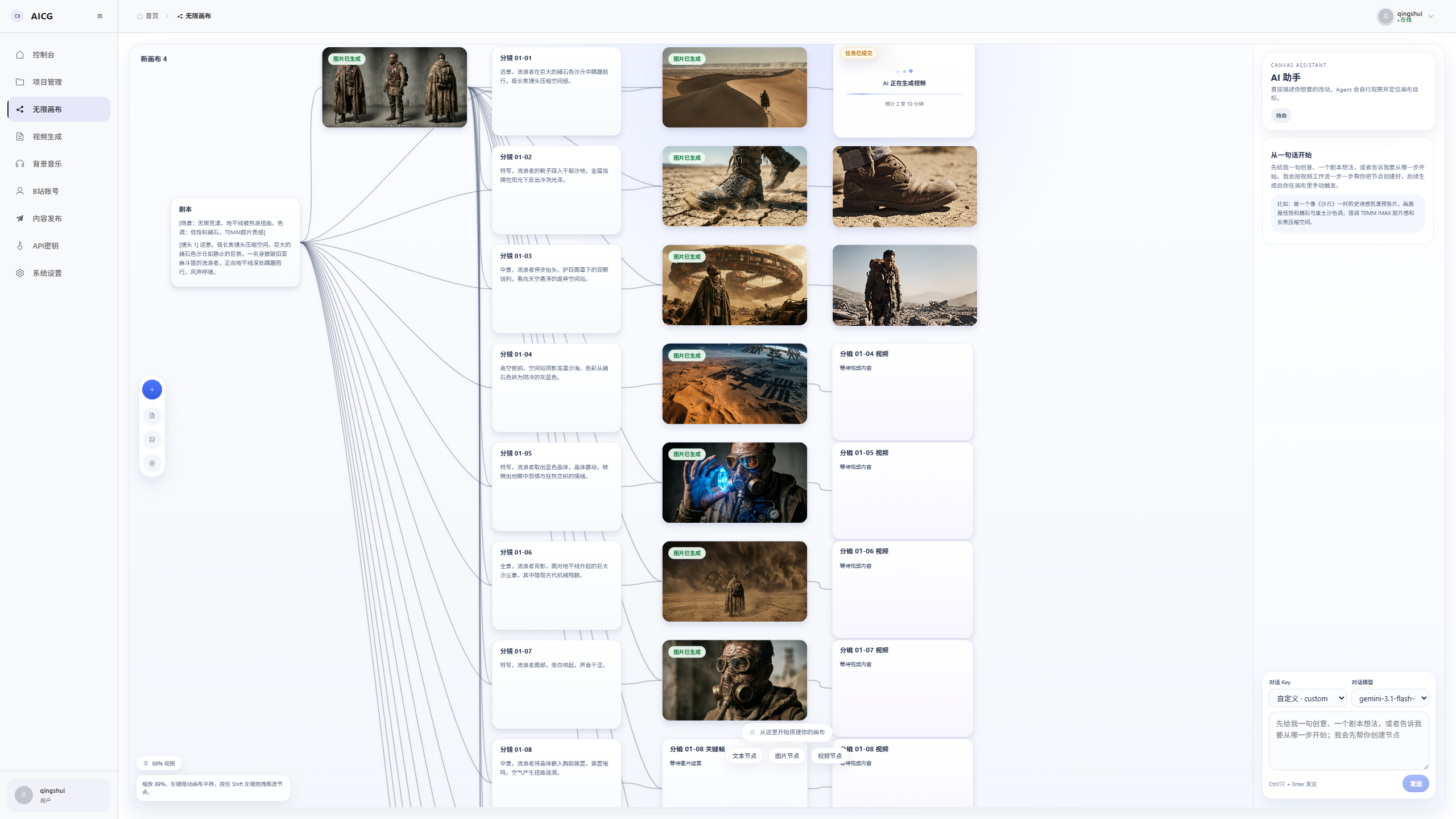
观看成片:《静默战争》 · 《艾尔登法环真人版预告》 · 更多功能截图
核心能力
- 剧本到分镜:拆解角色、场景与镜头,生成角色参考图、关键帧和过渡视频。
- 无限画布:连接文本、图片和视频节点,通过自然语言助手搭建可编辑的工作流。
- 图文与配音:按章节生成配图、语音和字幕,组合解说视频。
- 素材到发布:管理生成历史与参考素材,合成视频并对接 Bilibili 分发。
Canvas 助手负责创建节点与连线,生成任务由你手动触发。支持自定义兼容模型服务;模型调用费用由所选服务商收取。
快速开始
准备 Docker 和 Docker Compose v2:
git clone https://github.com/869413421/ai-moive-studio.git
cd ai-moive-studio

cp .env.production.example .env.production
# 编辑 .env.production,填写数据库、Redis、JWT、MinIO 等配置

docker compose --env-file .env.production -f docker-compose.prod.yml up -d
启动后访问 http://localhost,在「API 密钥管理」配置模型服务,再创建项目或画布开始创作。
完整步骤见 Docker 部署指南与模型配置说明。已有部署升级前,请查看更新记录。
关于中转站
AICON 模型中转站是我自己部署、自己也在用的大模型兼容中转站。做这个项目需要用到不同的模型,我希望有一个方便维护、能长期使用、成本也尽量合理的接入方式,所以把它一起开放给有需要的朋友。
AICON 不强制绑定这个站点,大家可以自行替换。 如果你已经有自己的兼容网关或模型供应商,可以继续使用自己的 API Key 和 Base URL,并按接入指南配置对应的模型与协议。
如果你想使用我的中转站:
- 在 api.aicon-studio.com 注册,按需购买额度,并在令牌页面创建 API Key。建议先少量体验,确认模型和效果适合自己再继续使用。
- 在 AICON 的「API 密钥管理」中选择「自定义」,填入 API Key;OpenAI 兼容接口的 Base URL 填写
https://api.aicon-studio.com/v1,末尾不加斜杠。
- 其他协议的调用方式见 API 接口文档,模型与价格可在站内查看。
已有用户请将旧中转站地址更新为上述地址;如果还有未完成的视频任务,请先保留原连接,具体说明见使用指南。
文档与交流
采用 Apache License 2.0 开源。