AI DevKit
English | 中文
The control plane for AI coding agents.
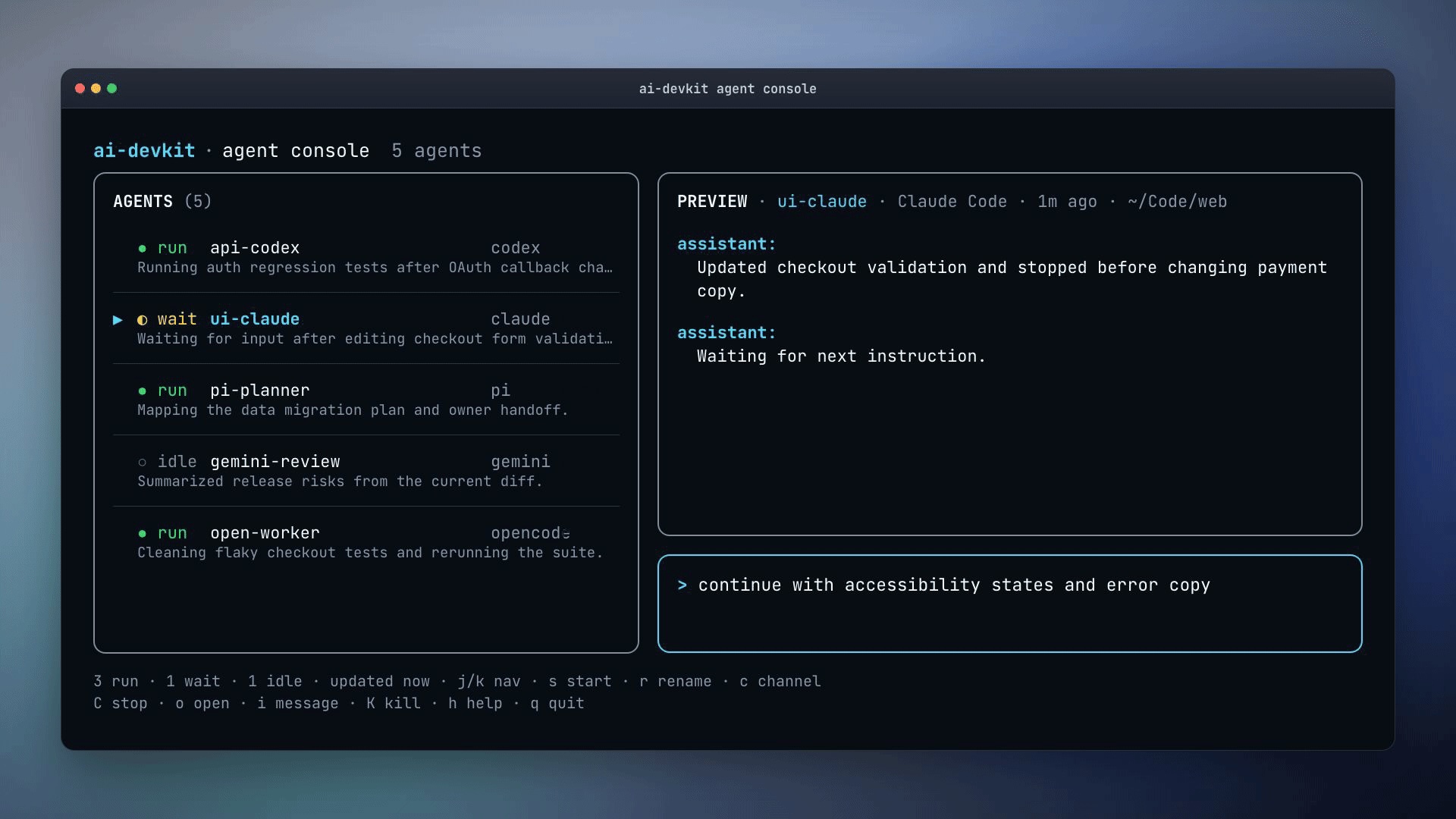
AI DevKit gives Claude Code, Codex CLI, Gemini CLI, opencode, Pi, Cursor, GitHub Copilot, Devin, and other coding agents one local-first operating layer: one config, one console, local memory retrieval, cross-agent communication, and composable engineering skills led by dev-lifecycle.
- One config for every agent —
.ai-devkit.jsonreconciles setup across the coding tools your team uses - One console for running sessions —
agent consoleis a live TUI dashboard for supervising local agents across providers - Cross-agent communication —
agent sendlets you route prompts, logs, and test output to running agents - Memory retrieval without context bloat —
@ai-devkit/memorystores decisions, conventions, and fixes in local SQLite so agents search when needed instead of carrying everything in every prompt - Composable engineering skills —
dev-lifecycle,verify,tdd, review, debugging, security, docs, and simplification skills combine into reliable workflows
The future is many AI coding agents. AI DevKit is the layer that makes them manageable.
Run npx ai-devkit@latest init and your project gets:
| What you need | What AI DevKit installs |
|---|---|
| One setup source | .ai-devkit.json for the agents and workflow you choose |
| Running-agent visibility | agent list, agent detail, and agent console |
| Addressable agents | agent send, --stdin, --wait, and agent groups where supported |
| Retrieval-based memory | Local SQLite memory exposed through MCP and CLI, searched only when useful |
| Composable senior-engineer workflow | dev-lifecycle plus verification, TDD, debugging, review, security, docs, and simplification skills |




Who this is for
Developers whose AI coding setup has grown from one assistant into a small, messy team of agents:
- multiple terminals with no shared control surface
- separate
CLAUDE.md/.cursor/rules/AGENTS.md/ MCP setup per tool - no easy way to send context, logs, or follow-up work to a running agent
- the agent forgetting yesterday's conventions
- "I've successfully implemented the feature" with a red build
- the agent diving into code without a plan and producing the wrong thing
Before AI DevKit, your agents are powerful but scattered. After AI DevKit, they have shared setup, a control surface, searchable memory, communication paths, and reusable skills that travel with your repo without bloating every prompt.
| Without AI DevKit | With AI DevKit |
|---|---|
| You manage agents as isolated terminal tabs | You supervise them from ai-devkit agent console |
| You hand-maintain every agent setup | One config reconciles agent files, skills, and MCP setup |
| You copy logs and context between sessions | agent send routes prompts and stdin to running agents |
| You repeat project rules in every chat | Agents retrieve relevant memory and docs only when useful |
| The agent jumps from prompt to code | dev-lifecycle guides requirements, design, planning, implementation, testing, and review |
| "Done" means the agent stopped editing | "Done" requires fresh verification output |
Start in 30 seconds
npx ai-devkit@latest init
One wizard. Pick your agents, install the control-plane pieces you need, and give every tool the same operating model. It writes project-local files you can review and commit. Re-run it whenever your agent list or workflow changes.
Here's what lands in your repo:
your-project/
├── .ai-devkit.json              # single source of truth (re-run init anytime)
├── .claude/                     # or .cursor/, .codex/, etc. per agent you picked
│   ├── skills/                  # dev-lifecycle, verify, memory, tdd, ...
│   └── settings.json            # MCP servers wired up (incl. @ai-devkit/memory)
└── docs/ai/
    ├── requirements/            # phase 1 — what to build, why
    ├── design/                  # phase 2 — how it'll be built
    ├── planning/                # phase 3 — task-by-task plan
    ├── implementation/          # phase 4 — execution notes
    └── testing/                 # phase 5 — coverage strategy
Operate agents like infrastructure
AI DevKit ships a agent control plane for everyday multi-agent work:
# List running sessions across providers
ai-devkit agent list

# Open the live terminal UI
ai-devkit agent console

# Send a prompt to a running session and wait for the response
ai-devkit agent send "run the tests and report back" --id <agent-name> --wait

# Pipe multi-line output into a running session
npm test 2>&1 | ai-devkit agent send --id <agent-name> --stdin

# Send a prompt to a saved group of agents
ai-devkit agent send "review this branch for release risk" --group reviewers

# Pipe a session through Telegram — operate your agent from your phone
ai-devkit channel start telegram --agent <agent-name> --daemon
Use this when work spans long-running agents, multiple providers, scheduled checks, review loops, or remote control from another channel.
Add memory without bloating context
AI DevKit memory is local SQLite knowledge for project decisions, coding conventions, and reusable fixes. Agents retrieve it when a task needs context instead of carrying every fact in every prompt.
# Store a reusable project convention
ai-devkit memory store \
  --title "API handlers return DTOs" \
  --content "REST handlers should return response DTOs instead of domain entities." \
  --tags "api,backend" \
  --scope "repo:codeaholicguy/ai-devkit"

# Search before related work
ai-devkit memory search --query "API response convention"
Compose engineering workflows with skills
The control plane is useful on its own. For larger or riskier changes, AI DevKit also installs composable skills that make agents behave more like an engineering team.
dev-lifecycle is the anchor skill. It guides the agent through requirements, design, planning, implementation, testing, and review. Other skills plug into that flow:
memoryretrieves relevant project knowledge without stuffing all context into the sessionverifyblocks completion claims without fresh test or build evidencetddpushes test-first implementation when behavior changesstructured-debugkeeps debugging reproducible instead of guess-and-patchsecurity-review,document-code, andsimplify-implementationadd focused review passes when the task needs them
Get the full engineering workflow stack
Save templates/senior-engineer.yaml locally and run:
ai-devkit init --template ./senior-engineer.yaml
Bundles the built-in skills with curated additions from Anthropic, Vercel, and others: TDD, frontend design, webapp testing, doc co-authoring, React best practices, security review, and more.
A feature, end-to-end
You:    Use the dev-lifecycle skill to start requirements for OAuth login with Google

Agent:  Searches memory for prior auth conventions. Asks clarifying
        questions about scope, users, success criteria. Drafts
        docs/ai/{requirements,design,planning}/feature-oauth-login.md
        in a feature worktree. Stops before coding.

You:    Ask for a design review of feature-oauth-login

Agent:  Audits the design doc against the requirements. Flags gaps,
        proposes fixes — before any code gets written.

You:    Ask it to execute the implementation plan

Agent:  Works the planning doc task-by-task. Updates progress after
        each task. The `verify` skill blocks a task from being
        marked done without fresh test/build output.

You:    Ask for a code review

Agent:  Audits the diff against the design doc — scope creep,
        missing tests, edge cases the requirements named —
        before you push.
What changes in agent behavior
The flow above is powered by nine built-in skills, each addressing a failure mode developers see in real AI coding sessions:
| Failure mode | AI DevKit behavior |
|---|---|
| Agent starts coding too early | dev-lifecycle forces requirements, design, planning, implementation, tests, and review |
| Agent says "done" without proof | verify blocks completion claims without fresh test/build evidence |
| Agent commits unrelated local changes | dev-commit checks diffs, stages explicit paths, validates, and reports the SHA/status |
| Agent forgets project decisions | memory gives it a local, searchable knowledge base across sessions and projects |
| New behavior ships without tests | tdd pushes test-first implementation |
| Debugging becomes guess-and-patch | structured-debug makes it reproduce, hypothesize, fix, and verify |
| Existing code is opaque | document-code maps entry points, dependencies, and behavior |
| Implementation gets bloated | simplify-implementation reduces complexity before code ships |
| Documentation is hard to follow | technical-writer audits docs for novice-user clarity |
Need more? ai-devkit skill add pulls from 30+ publishers — Anthropic, Vercel, Supabase, Microsoft, Google.
Works across coding agents
One .ai-devkit.json configures all of them. Add a new agent to your team without rewriting your rules.
| Agent | Setup | Remote control |
|---|---|---|
| Claude Code | yes | yes |
| Gemini CLI | yes | yes |
| Codex CLI | yes | yes |
| Grok Build CLI | yes | yes |
| Junie | yes | — |
| Cline | yes | — |
| Devin | yes | — |
| opencode | yes | testing |
| Pi | yes | yes |
| Cursor | yes | — |
| GitHub Copilot | yes | — |
| Antigravity | yes | — |
| Amp | yes | — |
| Kilo Code | yes | — |
| Roo Code | testing | — |
Setup — ai-devkit init writes the agent's config (rules, MCP servers, and skills) so it joins the same operating layer.
Remote control — drive running sessions from ai-devkit agent send and route them through external channels.
How is this different from CLAUDE.md, .cursor/rules, or AGENTS.md?
Those files are static instructions the agent re-reads. AI DevKit gives agents a operating layer: generated setup, a control console, cross-agent messaging, local searchable memory, phase docs, skills loaded on demand, and verification gates. The rules still matter, but AI DevKit makes them operational across tools.
| Static rules files | AI DevKit |
|---|---|
| Tell one agent what you prefer | Reconciles setup across supported agents |
| Do not show what is running | Lists, inspects, and controls live sessions |
| Cannot send work between sessions | Routes prompts, stdin, and channel messages to agents |
| Depend on the agent remembering every rule | Stores and searches reusable project knowledge |
| Cannot prove a task is complete | Requires fresh command output before completion claims |
What this isn't
- Not a smarter LLM. Bad models stay bad — this raises the floor on process, not on raw capability.
- Not a replacement for Claude Code, Codex, Cursor, Gemini CLI, or opencode. AI DevKit configures, supervises, and coordinates the agents you already use.
- Not a magic "write the feature for me" button. You still review the requirements doc, accept the design, and read the diff. The workflow makes that review possible because you have artifacts to point at instead of only chat scrollback.
- Not a hosted service. MIT-licensed, runs locally, no telemetry. Memory is a SQLite file on your disk. The agent control plane talks to the agent SDKs you already use.
Documentation & community
- Full guides, workflow patterns, skill authoring → ai-devkit.com/docs
- Release notes → CHANGELOG.md
- Contributing → CONTRIBUTING.md
git clone https://github.com/Codeaholicguy/ai-devkit.git
cd ai-devkit && npm install && npm run build
License
MIT