AGenUI
AGenUI is a high-performance A2UI SDK for building native generative UI experiences across iOS, Android, and HarmonyOS.
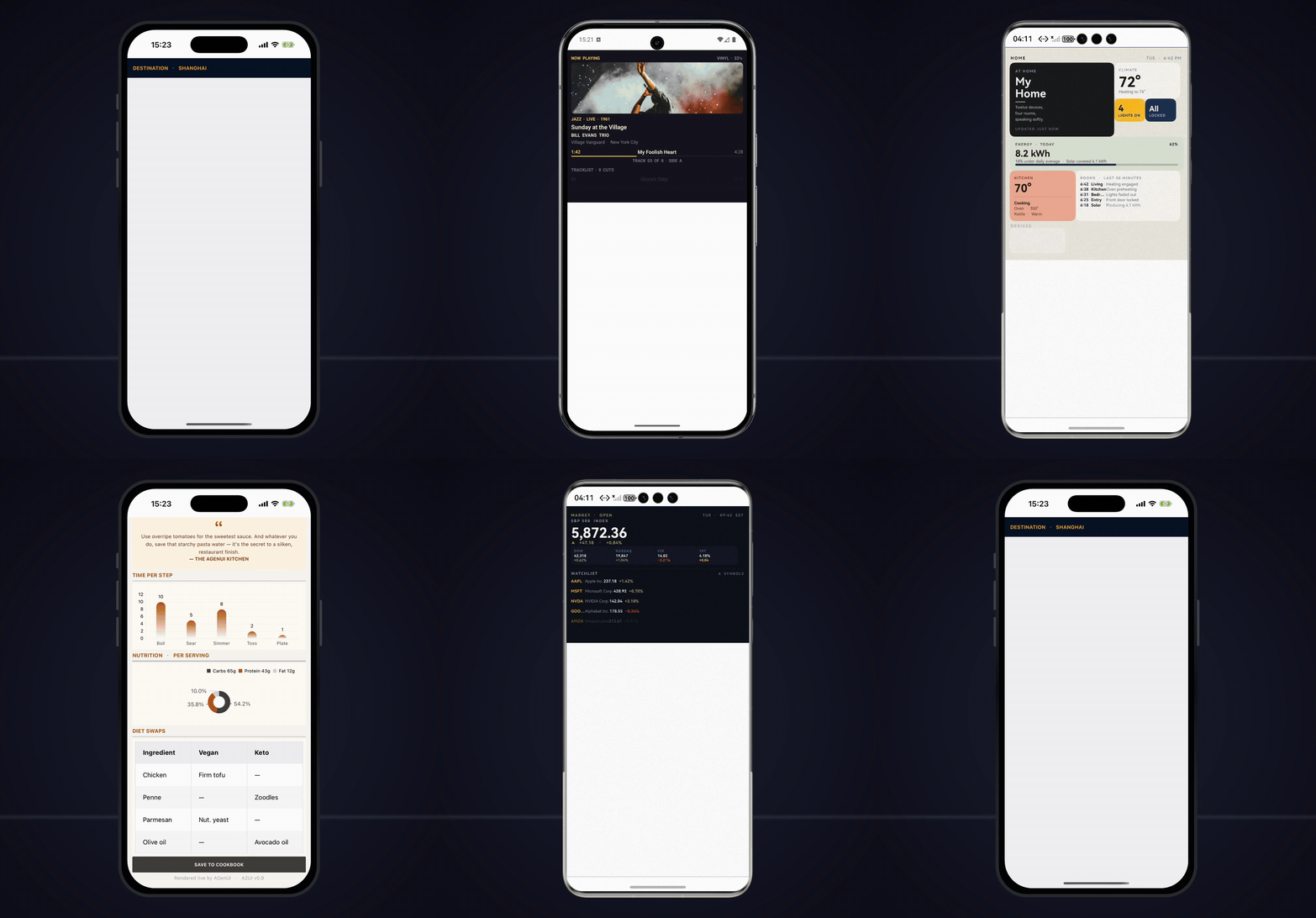





Official Website · Quick Start · API Reference · Contributing
English | 中文
This project is under active development and evolving rapidly. Contributions, feedback, and discussions are warmly welcome.
What's New in v1.5.0
Released on 2026-09-04
- (iOS) Runtime Configuration API: Added
AGenUI.setRuntimeConfig(_:), which accepts a JSON string of runtime switches from the host so behavior can be toggled remotely. Call it once during SDK initialization, before any surface renders. - (iOS) Physical Pixel Alignment: Hairline borders are promoted to an integer physical pixel width so all four sides render with identical weight on every screen scale, and component frames are snapped to the physical pixel grid so adjacent siblings stay gap-free. Governed by the
borderPixelAlignmentswitch (default on). - (HarmonyOS)
line-heightMeasurement Rework: Text measurement now carries the resolved absolute line-box height, matching the render side exactly. An explicitline-heightdefines the line box even when smaller than the font's natural metrics, andwhite-spaceno longer affects line-height resolution. font-weightCatalog Coverage: All three platforms now accept thenormal/medium/boldkeywords and numeric 100–900 weights, as either a JSON number or an integer string, with platform caveats documented in the catalog.- (iOS) Blank-Check Component Count:
onBlankCheckResultnow reports the component-tree size at detection time. Breaking change: the signature becomesonBlankCheckResult(_ surface:isBlank:componentCount:). - (Android) Fixed text disappearing for unbreakable digit and CJK strings at specific screen densities, by aligning measurement metrics with the rendering path.
- (iOS) Fixed properties applied during component initialization — most visibly a constant
trackInfo— never reaching listeners. - (HarmonyOS) Fixed DateTimeInput measurement carrying a stale line-height override.
What is AGenUI?
AGenUI is an A2UI SDK that simultaneously supports iOS, Android, and HarmonyOS. Built on and fully implementing the A2UI v0.9 protocol open-sourced by Google, it renders the streaming data of LLM-generated interactive UI in real time on mobile devices. Under the hood, it is powered by a cross-platform shared C++ core engine, while the three-platform rendering engines consume the component protocol dispatched by the core engine and perform drawing using native system capabilities.
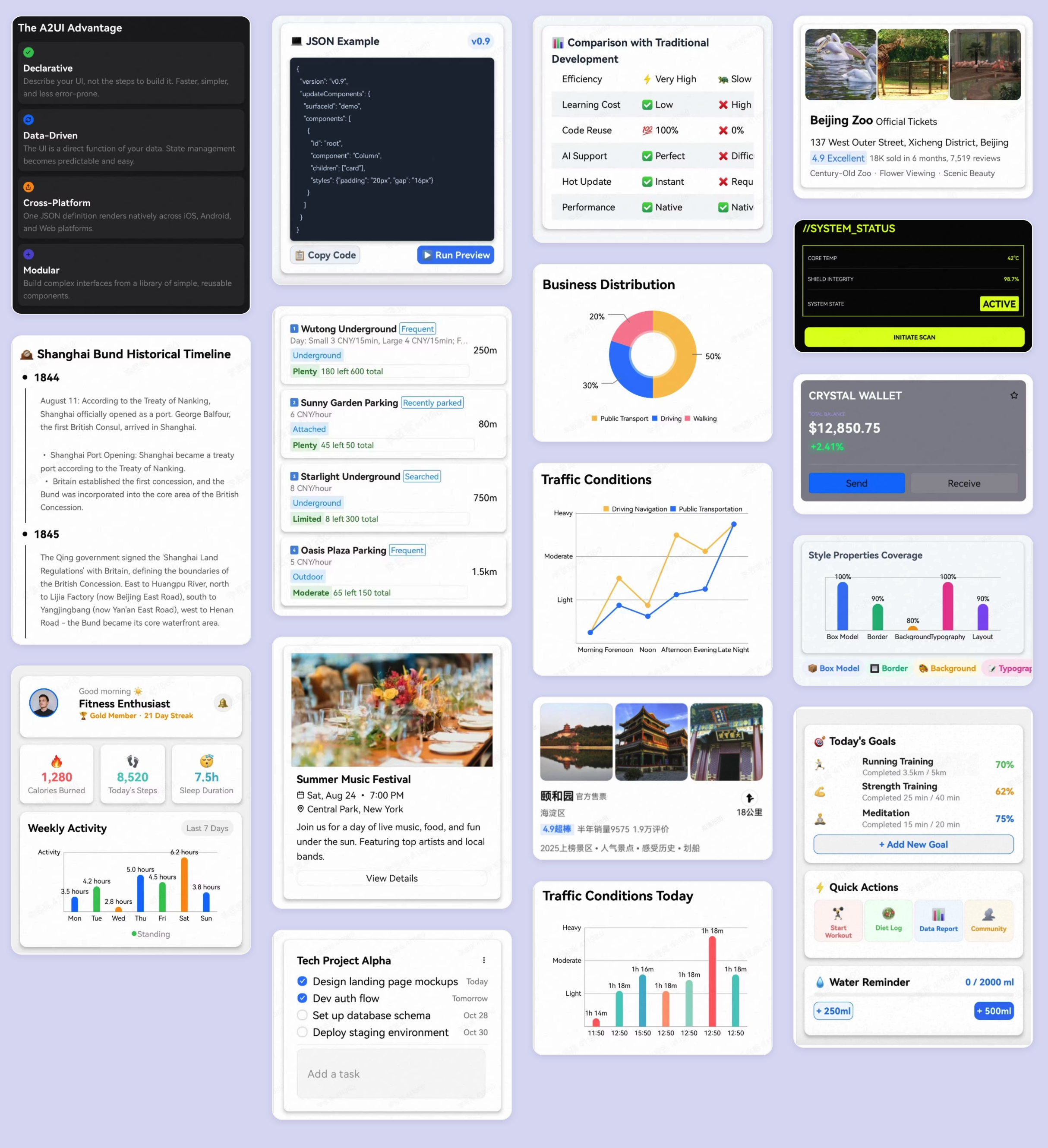
AGenUI leverages native system UI capabilities to render interactive cards, forms, lists, images, media players, and more, delivering a high-performance, smooth user experience.
Key Features
- Real-time streaming rendering — structured component descriptions are generated by the LLM, arrive incrementally, and update in real time
- High performance — native rendering on iOS, Android, and HarmonyOS, maintaining a 120 fps refresh rate in core scenarios such as page scrolling
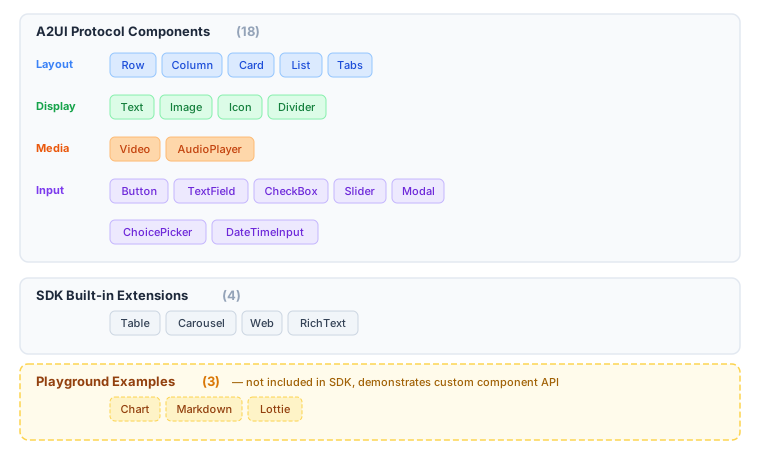
- 22 built-in components — 18 A2UI protocol components + 4 SDK extension components
- Custom component API — register and extend native components via the custom component API, so the LLM can emit component descriptions by component name
- Function Call integration — register client-side tools/functions that the LLM can invoke on demand
- Design Token & theming — unified Design Token system and theme modes across all three platforms
- Light / Dark mode — built-in light/dark appearance switching
Architecture
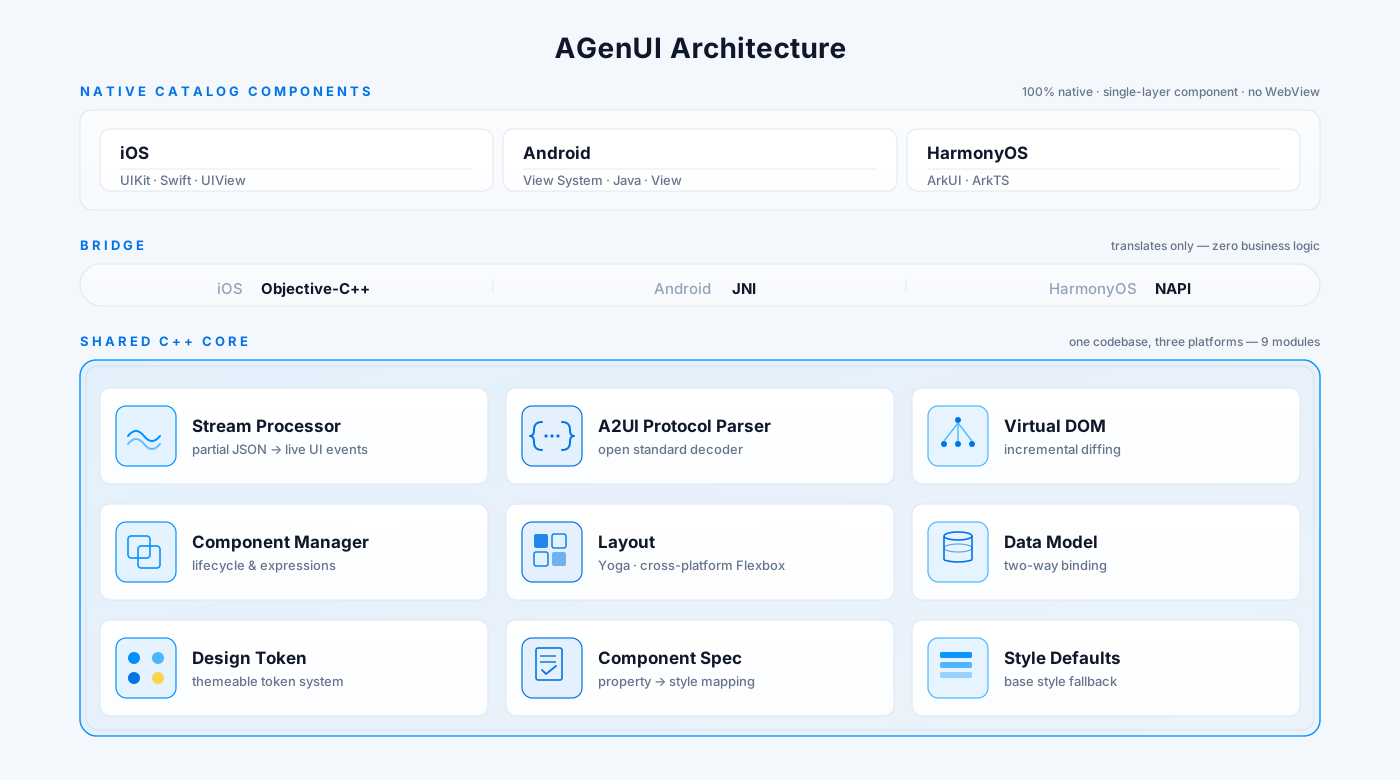
AGenUI adopts a shared C++ core engine + three-platform component rendering engines design. The C++ layer implements capabilities shared across all three platforms, including streaming data parsing, virtual component tree management, render data caching, theme/style resolution, and component change diffing. The C++ layer synchronizes the parsed component protocol to the three-platform rendering engines to trigger drawing.
Project Directory
| Path | Contents |
|---|---|
core/ |
C++ core engine — parser, differ, layout, Function Call framework |
core/include/ |
Public C++ API consumed by platform bridging layers |
platforms/ios/ |
iOS component renderer + Objective-C bridge |
platforms/android/ |
Android component renderer + JNI bridge |
platforms/harmony/ |
HarmonyOS component renderer + NAPI bridge |
playground/ |
Three-platform demo apps for development & debugging |
scripts/ |
Build scripts for each platform |
Components
A2UI Protocol Components
The following 18 components implement the A2UI protocol specification and are supported on all three platforms.
| Component | Description |
|---|---|
Text |
Styled text with variants (h1–h5, body, caption, etc.) |
Image |
Network image with scale modes and rounded corners |
Icon |
Icon rendered via Unicode / SVG mapping |
Divider |
Horizontal or vertical separator |
Video |
Native video player with seek and auto-hiding controls |
AudioPlayer |
Audio player with progress bar |
Button |
Tappable button that triggers Action events |
Row |
Horizontal flex container |
Column |
Vertical flex container |
Card |
Shadowed card container |
List |
Scrollable list with static or template-driven children |
Tabs |
Tab bar with switchable panels |
Modal |
Native dialog overlay |
TextField |
Text input with optional validation |
CheckBox |
Boolean toggle |
Slider |
Numeric range input |
ChoicePicker |
Single / multi-select picker |
DateTimeInput |
Date and time picker |
SDK Built-in Extension Components
The following 4 components are bundled with the SDK but are not part of the A2UI protocol specification.
| Component | Description |
|---|---|
Table |
Data table with Yoga sub-layout |
Carousel |
Image / content carousel |
Web |
Embedded WebView |
RichText |
HTML rich text rendering |
Playground Example Components
The following 3 components are registered and applied in the Playground to demonstrate integrating custom components via the API.
| Component | Description |
|---|---|
Chart |
Bar, line, and pie charts |
Markdown |
Markdown rendering with streaming support |
Lottie |
Lottie animation playback |
You can register your own components at runtime using the same API — see the Quick Start section.
Catalog File
The repository root includes agenui_catalog.json, a self-contained (freestanding) Catalog JSON Schema file conforming to the A2UI v0.9 specification. All external $refs have been inlined — it can be used standalone with no external dependencies.
Coverage:
- 25 components: 18 A2UI protocol standard components + 4 SDK built-in extension components (
Table,Carousel,Web,RichText), plus 3 Playground example components (Chart,Markdown,Lottie) - 14 functions: covering validation, formatting, logical operators, and URL navigation
- Shared type definitions: includes all A2UI v0.9 standard types, as well as
Styles(general style properties) andTextStyles(text-specific style properties) — both extended by AGenUI
How to use:
When integrating an LLM Agent, supply this file's content or its hosted URL as the catalogId in the supportedCatalogIds field of A2UI ClientCapabilities. The Agent will use this Schema as a constraint to generate strictly conformant A2UI JSON messages, ensuring the renderer correctly parses and renders all dispatched UI components.
A2UI Generation Skill
The skills/a2ui-generation/ directory ships a standalone A2UI generation Skill that can be mounted into any Agent that supports the Agent Skills mechanism (e.g. Claude Code, Cursor, Codex, Gemini CLI, Windsurf, GitHub Copilot, etc.). It guides the LLM — via the Skill's built-in design rules and constraints — to turn a natural-language query into A2UI protocol messages (updateComponents / updateDataModel) that AGenUI can render directly.
Installation
One-command install (recommended)
npx skills add AGenUI/AGenUI
Supports 55+ AI coding agent runtimes, including Claude Code, Cursor, Codex, Gemini CLI, Windsurf, GitHub Copilot, and more.
Manual install
git clone https://github.com/AGenUI/AGenUI.git
cp -r AGenUI/skills/a2ui-generation ~/.claude/skills/
For other runtimes, copy the
skills/a2ui-generation/directory to the corresponding skills directory (e.g.~/.cursor/skills/,~/.codex/skills/).
How to use
After installation, describe the UI you want through a query in your agent. The Skill drives the LLM to emit A2UI v0.9–conformant JSON protocol.
Layout & styling
- Default shape: a single Card, focused on the essential information.
- Custom layout & styling: your query can explicitly request other shapes (full page, list, table, etc.) or specific visual requirements (palette, spacing, font sizes, theme). When your explicit instruction conflicts with the Skill's defaults, the explicit instruction wins.
LLM selection
Different LLMs may produce somewhat different results when generating A2UI output. We recommend trying a few models against your own scenarios and picking the one that fits best.
AGenUI Studio
AGenUI Studio is a local, bring-your-own-key workbench that turns natural-language descriptions into renderable A2UI protocol — with a browser UI for streaming generation, live protocol preview, validation, and one-tap push to the AGenUI Playground on a real device via QR code. It builds on the open-source A2UI generation Skill (reusing its design rules and validator) and supports multiple LLM providers (DeepSeek, Qwen, GLM, OpenAI, Gemini, and more) and runs entirely on your machine.
npx agenui-studio
👉 See playground/studio/README.md for installation, configuration, and architecture details.
Quick Start
Toolchain Requirements
| Platform | Toolchain |
|---|---|
| Android | Android Studio Hedgehog+, NDK 27.3.13750724, API 35 SDK, JDK 11 |
| iOS | Xcode 15+, CocoaPods, CMake |
| HarmonyOS | DevEco Studio 4.0+, ohpm |
Building from Source
All build scripts live in the scripts/ directory. The C++ engine in core/ is compiled automatically — no separate preparation step is needed.
Android
# Release AAR (default)
./scripts/android/build.sh

# Debug AAR
./scripts/android/build.sh --debug

# Release AAR + native debug-symbol companion (see "Native debug symbols" below)
./scripts/android/build.sh --with-symbols

# Publish to local Maven (~/.m2)
./scripts/android/build.sh --publish-local

# Publish debug AAR to local Maven
./scripts/android/build.sh --debug --publish-local

# Publish to remote Maven (requires MAVEN_URL / MAVEN_USERNAME / MAVEN_PASSWORD env vars)
./scripts/android/build.sh --publish-maven

# Clean before building
./scripts/android/build.sh --clean
The AAR is written to dist/android/release/.
Native debug symbols (Android, opt-in)
For symbolicating release crashes on the host, run ./scripts/android/build.sh --with-symbols. The release build then:
- Skips
-Wl,--strip-allso the linker output retains DWARF info. - Splits DWARF into a sibling
lib.so.debugviaobjcopy --only-keep-debug(CMake POST_BUILD), then strips the.soand links them via.gnu_debuglink. - Packages the
.so.debugfiles into-symbols.aaralongside the regular release AAR, underbuild/outputs/aar/.
The release AAR size is unaffected — AGP strips the .so before packaging anyway. The .so.debug suffix follows the GNU/LLVM convention (objcopy's default debug extension) and has no relation to Android's debug buildType.
To symbolicate a crash address, unzip the symbols AAR and feed .so.debug to standard tools:
unzip -j <name>-symbols.aar 'jni/arm64-v8a/*.so.debug' -d ./symbols/

# Single address
$ANDROID_NDK/toolchains/llvm/prebuilt/<host>/bin/llvm-addr2line \
    -e ./symbols/lib<name>.so.debug -f -C 0xADDR

# Full backtrace from logcat
$ANDROID_NDK/toolchains/llvm/prebuilt/<host>/bin/ndk-stack \
    -sym ./symbols/ -dump crash.log
The flag is OFF by default — open-source builds see no change unless explicitly enabled.
iOS
# XCFramework (Release, default)
./scripts/ios/build.sh

# Single-arch Framework, Debug
./scripts/ios/build.sh -t framework -c Debug

# Force pod install then build
./scripts/ios/build.sh --pod-install
HarmonyOS
# HAR package (Release, default)
./scripts/harmony/build.sh

# Debug build
./scripts/harmony/build.sh --mode debug

# Custom output directory
./scripts/harmony/build.sh -o /path/to/output
Debugging with the Playground
A standalone Playground project is provided for each platform under playground. You can open and run any Playground project to experience the full A2UI component rendering. Each Playground references the AGenUI source code directly, so breakpoint debugging is supported.
Android Playground
- Open
playground/android/with Android Studio - Let Gradle install dependencies and index the source files
- Switch dependency mode via
gradle.properties:
# Source mode: changes to the C++ engine and the Android renderer take effect immediately
agenui.sdk.source=true

# AAR mode: no longer references source; consumes the pre-packaged SDK build (recommended only when debugging the Playground itself)
agenui.sdk.source=false
iOS Playground
- Enter the
playground/ios/Playgrounddirectory - Run
pod installto install dependencies and generate the Xcode workspace; on success,Playground.xcworkspacewill be generated underplayground/ios/Playground - Open
Playground.xcworkspace, pick a simulator, and build & run
Playground.xcworkspace already contains both the AGenUI source and the Playground target
HarmonyOS Playground
- Open the
playground/harmonydirectory with DevEco Studio - Let it install dependencies and index the source files
- Pick a simulator, and build & run
The project references platforms/harmony/agenui/ via srcPath, so any change to the AGenUI source is automatically picked up by the next build
Integrating the AGenUI SDK
For details on building the source into a directly integrable artifact (see Building from Source) and integrating it into your application, please refer to:
SDK installation & usage guide: Quick Start
Complete SDK API reference: API Reference
Contributing
Contributions of all kinds are welcome — bug fixes, new components, platform improvements, documentation, and test coverage.
Before submitting a pull request, please read CONTRIBUTING.md for the full workflow, code style guidelines (C++, Swift, and Java follow the Google Style Guide; ArkTS follows the OpenHarmony conventions), and the PR checklist.
Quick summary:
- Fork the repo and create a branch from
main:fix/123-my-fixorfeat/my-feature - Make your changes and add tests where appropriate
- Build and test locally on the affected platform(s)
- Open a PR against
mainwith a clear description of what and why - At least one maintainer approval is required before merging
For larger changes — new platform support, significant engine refactors, new component categories — please open an issue first to align on the approach before writing code.
Community & Contact
- GitHub Issues: bug reports and feature requests
- GitHub Discussions: Q&A and general discussions
- Email: tengjixiang.ttjx@alibaba-inc.com
- DingTalk Group: Chinese community
- WeChat Group: Chinese community
| DingTalk Group | WeChat Group |
|---|---|
 |
 |
License
AGenUI is released under the Apache License, Version 2.0.