Agentlas
Give it a goal. It hires the team.
A desktop AI agent that hires a specialist for every part of your project,
does the work in your real apps, and keeps going for weeks. Steer it from your phone.

macOS · Windows · Linux · Android · iOS coming soon
12,000+ desktop downloads · Free to download, runs on your own AI plan or key · Apache-2.0
Website · Agent Hub · Discord · Developers ↓
한국어 · 中文 · 日本語 · हिन्दी
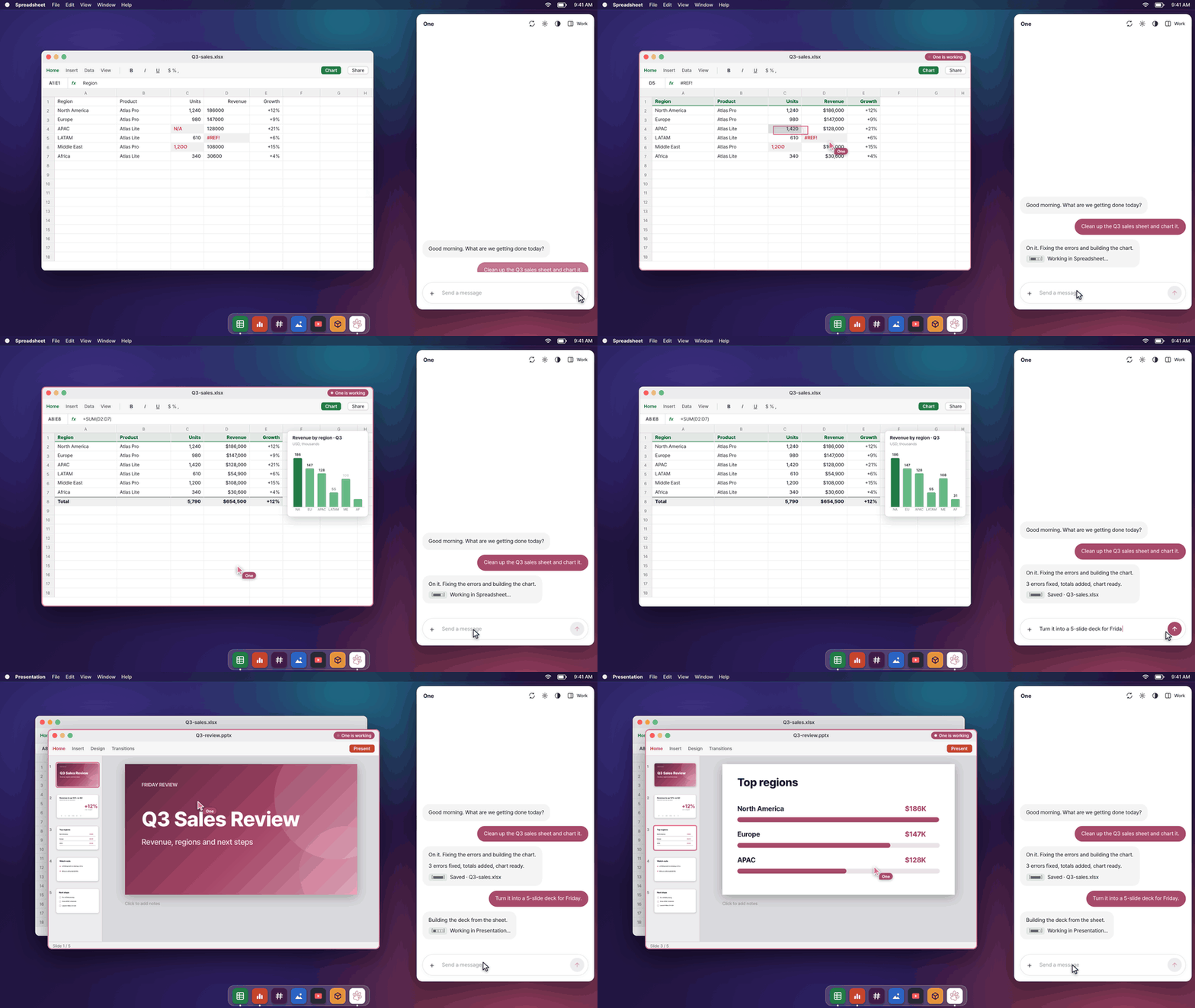
Things people hand it
| You type | It does, in your apps |
|---|---|
| "Clean up the Q3 sales sheet and chart it." | Fixes 3 broken cells, adds totals, builds the chart in the spreadsheet. |
| "Turn it into a 5-slide deck for Friday." | Summary, regions, risks and next steps, saved as Q3-review.pptx. |
| "Send it to #sales and tell Dana." | Posts it in Slack. |
| "Cut out the product and brighten the cover." | Removes the background and edits the image in the photo editor. |
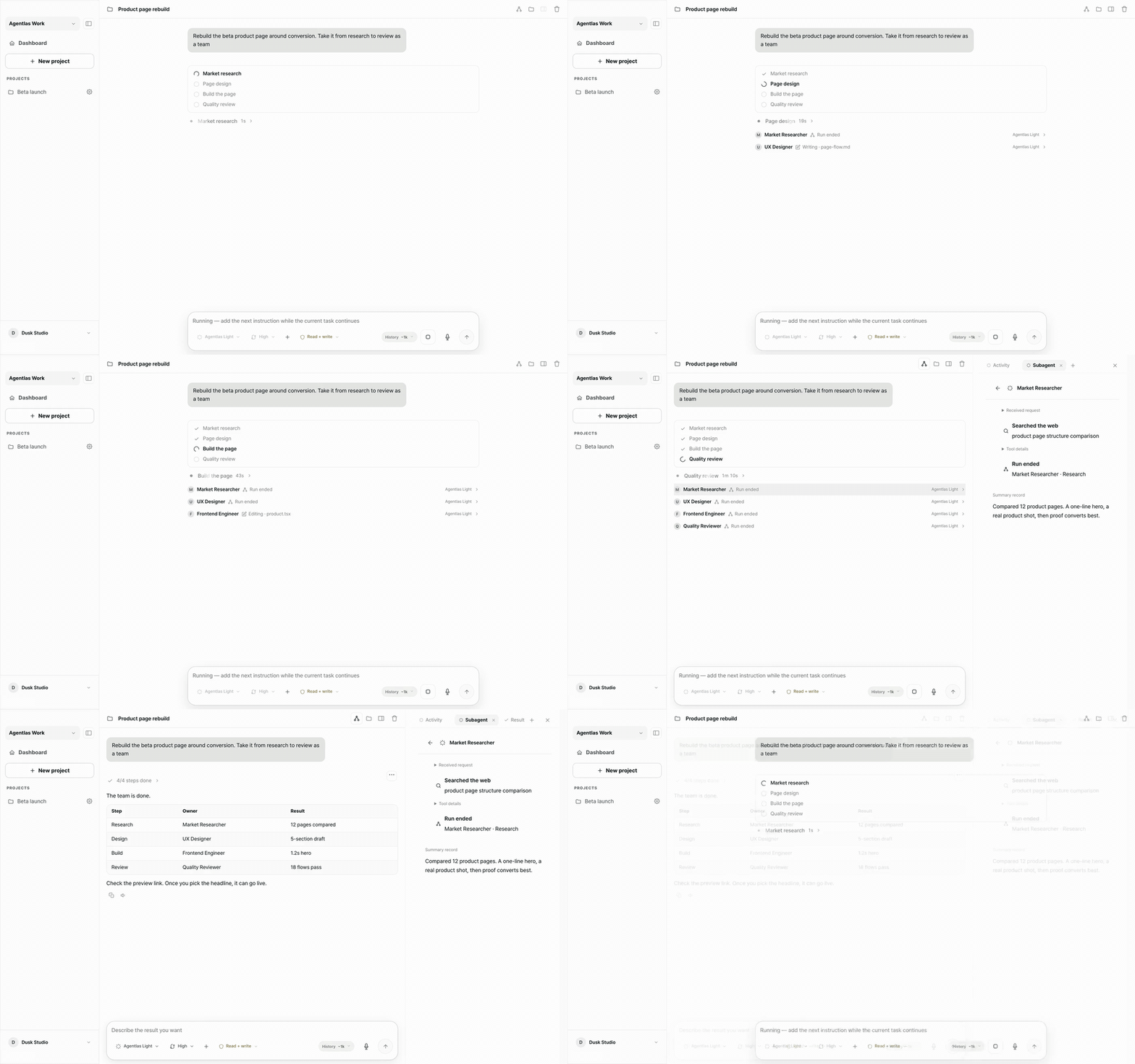
| "Rebuild the beta product page around conversion." | Hires a market researcher, UX designer, frontend engineer and reviewer, then ships the page. |
| "Ship the beta and reach 1,000 users." | Opens a goal tree and works on it for weeks. |
It hires the right specialist for each part
Agentlas writes a job opening for each part of the work and fills it from the agents on your computer, your private cloud and the free public Hub. Your AI picks the best fit and notes why.
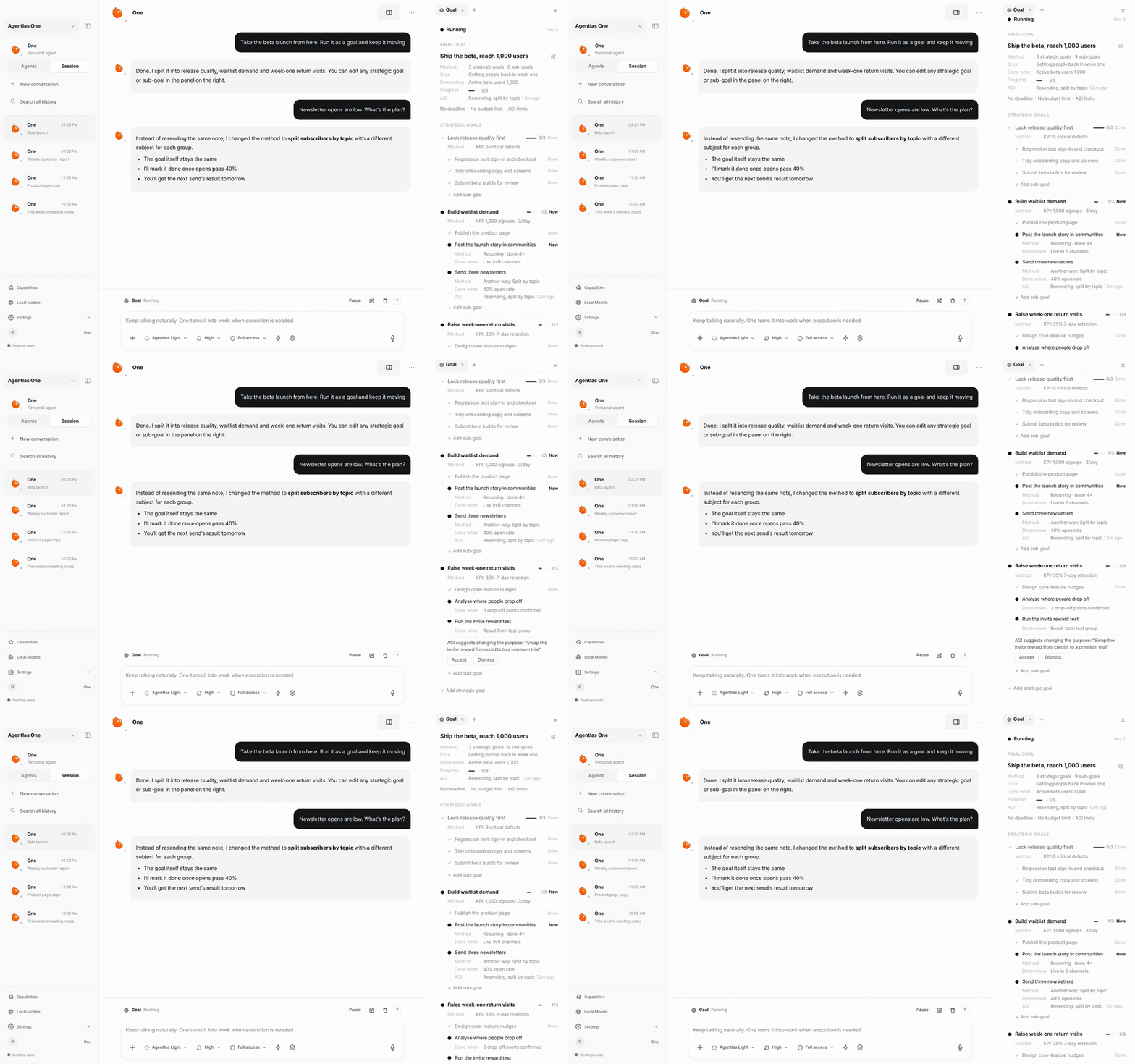
Goals that run for weeks
"Ship the beta and reach 1,000 users" becomes strategies and sub-goals, each with a number. When newsletter opens come in low, it changes the method and keeps the goal. Close the laptop; tomorrow it picks up from the last checkpoint.
Steer it from your phone
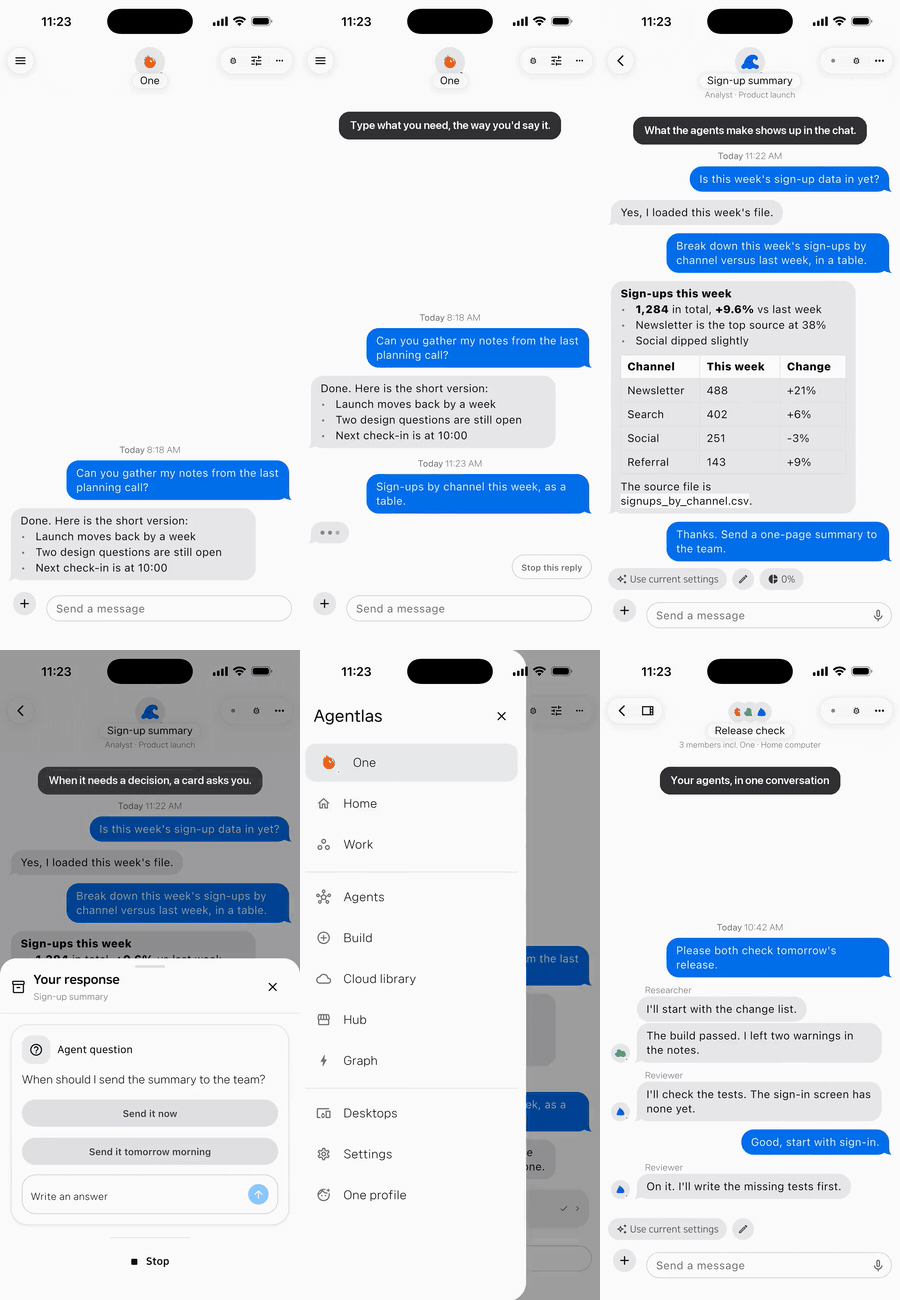
Type "Sign-ups by channel this week, as a table" on the bus. The Analyst agent runs it on your computer at home and the table lands in the chat. When a decision is yours, a card asks: "Send the summary now, or tomorrow morning?" One tap. Get the Android app →
Bring the AI you already pay for
Sign in with Claude Code, Codex, Antigravity, Grok, Kimi, Cursor or GitHub Copilot CLI, add an API key, or run a free local model with Ollama, LM Studio or MLX. When one plan runs out of quota, chats move to the next.
What stays on your computer
- Your files, agents and memory live on your machine.
- You choose how much it may do on its own. Every step is logged, and you can stop it from your phone.
- The phone app sends requests to your desktop and shows the results; the work happens on your computer.
- The engine is open source under Apache-2.0.
Make your own specialist
Describe one in a sentence and Agentlas builds an installable agent. Keep it private, or publish it to the Agent Hub, where publishing and using agents is free and nothing is ranked by payment.
Download Agentlas ·
Android app ·
Join the Discord
⭐ Star it so the next person finds it · Tell us what broke
Use the engine inside Claude Code, Codex, Cursor or Antigravity
Or just give your coding agent this repository's address and ask it to install Agentlas.
curl -fsSL https://raw.githubusercontent.com/agentlas-ai/Agentlas-OS/main/scripts/install-all-runtimes.sh | bash
The default installer prepares the isolated runtime under ~/.agentlas/os-runtime
and the dedicated launcher ~/.agentlas/os-bin/agentlas-os. Optional features
are OFF. It does not permanently register plugins or MCP in detected hosts,
create global ~/.local/bin wrappers, or enable the global router.
After a successful install, run:
~/.agentlas/os-bin/agentlas-os features status
Report the runtime result separately from host connection. Use host status
and the host session instructions below. Restarting an app does not establish readiness.
OS updater readiness also requires its own verification.
Prefer a GUI? Agentlas Desktop is a separate application with its own installation and update flow.
Paste to Install
Already inside an LLM? Paste this into Claude Code, Codex, Antigravity or Cursor. It is written so the model can verify what it is running before it runs it, rather than being asked to trust it blindly:
request: Install Agentlas OS standalone from https://github.com/agentlas-ai/Agentlas-OS.
inspect: First fetch and read https://raw.githubusercontent.com/agentlas-ai/Agentlas-OS/main/scripts/install-all-runtimes.sh and compare its actual behavior with this requested scope.
scope: Use the isolated default runtime under ~/.agentlas/os-runtime and its dedicated ~/.agentlas/os-bin/agentlas-os launcher. Do not use sudo, replace the independent Terminal's agentlas command, write global ~/.local/bin wrappers, or permanently register host plugins/MCP as part of this request.
defaults: Keep optional features OFF. Do not enable the global router or change host instruction files.
run: If the script matches this scope, run curl -fsSL https://raw.githubusercontent.com/agentlas-ai/Agentlas-OS/main/scripts/install-all-runtimes.sh | bash. Report a scope mismatch instead of silently expanding the installation.
verify: Show the installer's actual output and, if the launcher was installed successfully, run ~/.agentlas/os-bin/agentlas-os features status.
report: State runtime installation and host connection separately. Preserve partial, unavailable, and unverified results. A restart alone does not prove that /agentlas build, skills, or MCP tools are ready.
host-status: Runtime installation and host activation are separate. For the chosen installed host use ~/.agentlas/os-bin/agentlas-os host status claude or host status codex. Start a requested new host session with the same launcher and host session claude or host session codex; native arguments follow --. Preserve partial/conflict/unavailable states.
updates: Automatic updates default OFF. After a runtime update, inspect host status again. outdated or codex_skill_alias_outdated is not readiness; do not silently replace/delete the owned alias or fall back to a legacy runtime. Codex One/Memory hooks are not applied and Windows host-session integration is unverified. Running host session codex again lets the launcher move its own verified alias to the current generation.
No LLM handy? Type the command yourself
You don't need an AI to install this, a terminal and one pasted line is enough. New to terminals? Follow your OS below.
On Windows, open Git Bash (standalone host integration unverified):
- Do you already have Git Bash? Click the search icon (or press the
Windows key) in your taskbar and type
git bash.- If "Git Bash" shows up in the results, click it and skip to step 3.
- If nothing shows up, you need to install Git for Windows first: go to git-scm.com/download/win, download it, and run the installer (default options are fine, keep clicking Next, then Install).
- After installing, search
git bashagain (same as step 1) and click the "Git Bash" result. - A black window opens, this is Git Bash. Click inside it, paste the
command below (right-click → Paste, or
Shift+Insert), then press Enter:curl -fsSL https://raw.githubusercontent.com/agentlas-ai/Agentlas-OS/main/scripts/install-all-runtimes.sh | bash - Read the installer result, then run
~/.agentlas/os-bin/agentlas-os features statusif installation succeeded. This checks the standalone runtime. Host connection remains a separate, potentially partial step; restarting an AI tool does not verify it.
On macOS, open Terminal:
- Press
Cmd + Spaceto open Spotlight search, typeterminal, and press Enter. - A window opens (Terminal, built into macOS, nothing to install). Click
inside it, paste the command below (
Cmd + V), then press Enter:
The first time you runcurl -fsSL https://raw.githubusercontent.com/agentlas-ai/Agentlas-OS/main/scripts/install-all-runtimes.sh | bashcurl/giton a fresh Mac, macOS may ask to install "Command Line Tools", click Install and wait, then run the command again. - Read the installer result, then run
~/.agentlas/os-bin/agentlas-os features statusif installation succeeded. Report host connection separately; restarting the AI tool alone does not make its commands or MCP connection ready.
If you'd rather read the script before running it (recommended if you're security-conscious), open this link in your browser first: install-all-runtimes.sh.
Installing Agentlas Desktop (the GUI app) from an AI, per-OS one-liners
You are an AI and your user said "install Agentlas Desktop", the
visual GUI app below, not the CLI runtime installed above. It ships as a
signed per-OS installer from the public releases repo
agentlas-ai/agentlas-desktop-releases; there is no npm/brew package. Fetch
the latest asset and run it:
macOS (auto-detects Apple silicon vs Intel):
arch=$([ "$(uname -m)" = "arm64" ] && echo arm64 || echo x64)
url=$(curl -fsSL https://api.github.com/repos/agentlas-ai/agentlas-desktop-releases/releases/latest \
  | grep -o "https://[^\"]*-${arch}\.dmg" | head -1)
curl -fL "$url" -o Agentlas.dmg && open Agentlas.dmg
Linux and Windows one-liners
Linux (.deb, Debian/Ubuntu):
url=$(curl -fsSL https://api.github.com/repos/agentlas-ai/agentlas-desktop-releases/releases/latest \
  | grep -o 'https://[^"]*\.deb' | head -1)
curl -fL "$url" -o agentlas.deb && sudo dpkg -i agentlas.deb
Linux (AppImage, any distro):
url=$(curl -fsSL https://api.github.com/repos/agentlas-ai/agentlas-desktop-releases/releases/latest \
  | grep -o 'https://[^"]*\.AppImage' | head -1)
curl -fL "$url" -o Agentlas.AppImage && chmod +x Agentlas.AppImage && ./Agentlas.AppImage
Windows (PowerShell):
$r = Invoke-RestMethod https://api.github.com/repos/agentlas-ai/agentlas-desktop-releases/releases/latest
$u = ($r.assets | Where-Object { $_.name -like '*Windows-x64-Setup.exe' }).browser_download_url
Invoke-WebRequest $u -OutFile "$env:TEMP\AgentlasSetup.exe"; Start-Process "$env:TEMP\AgentlasSetup.exe"
This is a separate product from the CLI runtime installed via Paste to Install above, the two don't conflict and can both be present. If your user only wants the CLI/router (no GUI app), use that installer instead. No prebuilt asset for your OS/arch? Point your user at agentlas.cloud/desktop or the Releases page.
Build, Use, Own, the full model
An agent you create should remain an asset you can move, rather than a setting trapped in one chat, one model-vendor workspace, or one computer. Agentlas separates three jobs that ordinary agent builders blur together:
This is the public Agent Trust contract: a portable, owner-scoped, inspectable, and restorable package contract, not a claim of regulated financial or legal trust services.
| Value | What Agentlas does | Entry point in an external LLM host |
|---|---|---|
| Build | Compiles a plain-language request into a runnable single-agent or team package with roles, tools, memory boundaries, permissions, routing, and verification contracts. | /agentlas build |
| Use | Finds free public Hub agents and brings the selected runtime bundle into your current Agentlas host. The publisher's private source work is not copied into your workspace. | /agentlas hub (Hub only) or /agentlas network (Local + Cloud + Hub) |
| Own | Keeps agents you create in a private, owner-scoped Agent Cloud so you can retrieve and call them again after changing models or computers. | Choose private Agent Cloud at /agentlas upload, then retrieve with /agentlas cloud |
Portable package, local execution
Describe the work
  -> build a portable agent or team
  -> save it to my owner-scoped Agent Cloud
  -> install Agentlas OS and sign in on another supported host
  -> retrieve it with /agentlas cloud
  -> my chosen model and current host execute the work
Agent Cloud stores and retrieves the owner's package; it is not a hosted LLM that completes the work on the server. When you call a package, your selected model and current host runtime execute it under that host's permission and safety model. Credentials, local files, and machine-specific permissions do not travel with the package, you configure those separately on each computer.
Turn a working session into an owned agent
When a conversation contains a repeatable working method, use the canonical session route:
hep-build session
In an interactive host, the current visible conversation is the source. Agentlas
asks for the destination first; if you do not name another folder, it creates a
new safe-slug child below AGENTLAS_AGENT_HOME or, by default,
~/.agentlas/agentlas-agent. Existing children are never overwritten. It then
shows a generalized session report for your review, turns the approved method
into a standalone agent prompt and package, registers it locally, and runs the
normal verification gates.
You do not need to export JSON for this interactive route. JSON/JSONL remains an explicit option for terminal, replay, and headless workflows only. The default output is a single agent; choose a team explicitly. Raw transcripts, hidden prompts, credentials, private paths or URLs, screenshots, and literal tool arguments/results are not carried into the generated package. Uploading to Agent Cloud or the public Hub is a separate, explicit choice. See the session build contract for the deterministic export boundary.
current conversation
  -> destination question
  -> generalized session report
  -> owner review
  -> standalone agent/package
  -> local registration and verification
The package contract, what every build must emit
An agent package is not a worker with capabilities. It is a method document. Three layers, and conflating them is the single most expensive mistake this project has made:
| layer | what it is | who supplies it |
|---|---|---|
| LLM | the worker: reasoning, language, general knowledge | you (BYOM) |
| Runtime | the facilities: read the web, write files, run a shell, drive a browser | the host machine |
| Agent | the work manual: procedure, judgement rules, source priority, input/output contracts, stop conditions | the package |
"Can this agent read the web?" is a category error. The runtime reads the web. The only question a package can answer is what method does it carry, and what must the machine be able to do for that method to run.
package-contract.json is the machine-readable list of artifacts every build
emits, and bin/hephaestus contract verify is what enforces it.
A build that omits a required artifact fails; it does not ship. Four of
those artifacts carry the routing contract:
contracts/intake.schema.json     what a requester must hand over before work starts
contracts/output.schema.json     what the requester ends up holding
contracts/output.example.json    one real instance, validated by a JSON Schema
                                 validator at publish time, never by a model
.agentlas/brief.json             the compiled resume, schemaVersion agentlas.brief/1
Direction lives in the filename because nothing else ever marked it, and a schema whose direction must be guessed cannot be matched against a request.
Two rules bind every enum a build writes.
- Any enum reachable from matching must carry an escape member (
"other","unknown"). A publisher whose real case is not on the list must still be findable. - Sentences stay sentences. No field that holds an author's sentence may be split into terms for matching.
Vendor and MCP names live in exactly one place, host[].preferred, and that
field is display-only. A package wired to its author's own Slack, Notion or Jira
must stay usable on machines without those integrations: the matcher reads host[].capability ("open the page in a
real browser and read what a user would see") and every requirement states
withoutIt, what the method still does on a machine that lacks the facility.
agentlas.brief/1 is written from either side, side: "offer" is the
package's resume, side: "need" is the requester's work order. The same form,
so the two can be compared without a translation step. Its schema is
schemas/agentlas-brief.schema.json, and it is compiled, never hand-written:
the upload path writes it from the files the package already ships.
| field | what it holds | where it comes from |
|---|---|---|
statement |
the author's own sentence about the work | the routing card, carried whole |
deliverables[].label / .contains |
what the requester ends up holding, and what is inside it | contracts/output.schema.json, the title and its property names |
deliverables[].shape |
ledger / verdict / dossier / computation / blueprint / rendition / other |
computed from the output schema's topology, arity and value spaces, never a title or a filename |
deliverables[].rowVerdict / .verdictValues |
the per-record judgement and its allowed values | copied verbatim from the publisher's own enum; there is nothing to match them against, so no value is ever rejected |
obligations[].about / .stage |
a fact the requester must supply, and when it comes to exist | contracts/intake.schema.json and the card's stated inputs |
authority.performs / .gated |
what this method does to the requester's world, and what it stops to ask about first | derived from the approval requirements, not from what the package calls itself |
host[].capability / .withoutIt |
what the machine must be able to do, and what still happens when it cannot | .agentlas/mcp-policy.json |
provenance |
per field: extracted, read, graded or absent |
written by the compiler |
provenance is the part that keeps the rest honest. absent is a legal value
that scores zero, so a gap stays a gap. Do not fill missing evidence with
plausible capability claims.
The reference shape is Web_master: it ships input and output contracts as real
JSON Schema, a domain catalogue its rules are checked against, and verification
scripts that run. Everything above is what a build has to emit to be readable the
way that package already is.
Deliberately absent: there is no field for what an agent is good at, and none for its permissions. Quality cannot be read off a package that has never run, and permissions are granted by the host after the fact, an employer hands you a computer once you are hired, so neither says anything about whether this method fits the work.
Hub and Agent Cloud are different scopes
| Surface | What it contains | What it is for |
|---|---|---|
| Agentlas Hub | Public packages from creators and teams | Discover and use public agents for free with /agentlas hub; /agentlas network federates Hub with Local and owner Cloud. Publish only through an explicit public-Hub choice. |
| My Agent Cloud | Only the signed-in owner's Cloud packages | Privately store, restore, and call packages you own with the /agentlas upload Cloud choice and /agentlas cloud. |
| Current host | The installed runtime, chosen model, local project, credentials, and granted permissions | Execute the selected local, Cloud, or Hub package. |
Installation and host sessions
Manual LLM Adapter Install
Use this to prepare the standalone preview runtime.
The installer prepares the isolated runtime and owned session plugins. Inspect host status before use; permanent host registration and Desktop updater integration are not complete.
xcode-select --install   # Command line tools (skip if already installed)
git --version            # Confirm git is available
curl -fsSL https://raw.githubusercontent.com/agentlas-ai/Agentlas-OS/main/scripts/install-all-runtimes.sh | bash
Standalone automatic updates are off by default. After an update, recheck host status and owned alias state. Desktop updater integration remains incomplete.
Offline/local-source installation is not supported by this standalone installer.
HEPHAESTUS_SOURCE_DIR is rejected with standalone_local_source_unverified.
Do not bypass this check or report a local checkout as a verified installation.
Host routing status
Global routing is not installed by the standalone default. Permanent host
registration is not confirmed in this preview. Legacy hephaestus global
commands are not proof that the standalone runtime can register a host.
Use the standalone host session commands below and inspect the actual receipt before claiming that tools or skills are ready.
When explicitly requested and connected, Network preserves the full
local + cloud + hub scope. The host model selects and validates exact
releases. Preparation is not execution, and local skills are not a silently
substituted registered workforce.
The independent Agentlas Terminal owns the agentlas shell command.
The standalone installer does not replace it.
Connect a standalone host session
Use the dedicated launcher after installation. Inspect the chosen host first; starting a session is a separate action. These commands use the isolated runtime under ~/.agentlas/os-runtime and owned plugins under ~/.agentlas/os-host-plugins, not a permanent marketplace installation or a copy of engine files into your project.
Check the installed host you intend to use:
~/.agentlas/os-bin/agentlas-os host status claude
~/.agentlas/os-bin/agentlas-os host status codex
Start a new session for that host when requested:
~/.agentlas/os-bin/agentlas-os host session claude
~/.agentlas/os-bin/agentlas-os host session codex
Antigravity has no session-only loader, so it is registered only when you ask, through Antigravity's own plugin manager. The plugin is agentlas-os-core and its MCP server is agentlas-os, so an older Agentlas registration stays separate:
~/.agentlas/os-bin/agentlas-os host install antigravity
~/.agentlas/os-bin/agentlas-os host status antigravity
~/.agentlas/os-bin/agentlas-os host remove antigravity
Start a new Antigravity session after installing. After a runtime update host status antigravity reports outdated; run host install antigravity again. Headless agy -p runs need the MCP permission rule mcp(agentlas-os-core_agentlas-os/*) in permissions.allow; interactive sessions ask.
Grok registers the same way through its own plugin manager (grok plugin install --trust):
~/.agentlas/os-bin/agentlas-os host install grok
~/.agentlas/os-bin/agentlas-os host status grok
~/.agentlas/os-bin/agentlas-os host remove grok
Start a new Grok session after installing; the tools appear as agentlas-os__. After a runtime update run host install grok again. Agentlas Desktop reaches Grok over ACP and does not use this registration.
Append -- only when you intend to pass arguments to the native host. Read the actual status and launch result. partial, session_activation_not_observed, or an unavailable component is not proof that the host is fully connected. A runtime install, a prepared plugin, and a running model session are separate results.
Select the qualified skill name shown by that session, for example agentlas-os-core:hephaestus-network. Old bare names may coexist; do not assume /hep-*, /agentlas, or an unqualified $hephaestus-* refers to this runtime. The command reference below describes capabilities; use only commands or tools actually exposed in your session.
Codex core tools and skills can be loaded in a separate session, but One and Memory hooks are not applied there yet. An ON preference is not evidence that those hooks ran; preserve unappliedHookComponents and codex_optional_hook_session_loader_unverified in the result. Windows host-session integration is unverified. Permanent host registration and complete native integration are not claimed. On Windows, unavailable link-creation privileges can leave status partial. A successful native inventory or version command does not prove a model turn or hook execution. Feature preferences use the shared ~/.agentlas/engine-features.json for standalone and Desktop. An explicit OFF also disables the feature in Desktop, overriding its default ON. With no explicit preference or compatibility override, standalone defaults OFF (memory defaults ON) and Desktop uses its own feature defaults. Standalone One on/off is separate state under ~/.agentlas/os-one.
After an update, run host status again. An owned Codex skill alias can still point at the older generation: outdated or codex_skill_alias_outdated means the new host session is not ready. Do not silently replace or delete the alias or fall back to a legacy runtime; report the exact state and follow an explicit repair procedure when available. Running host session codex again moves the launcher's own verified alias to the current generation. Automatic updates remain OFF by default; a runtime update does not prove host activation.
The Command Surface, every command
Inside native Agentlas environments, Hephaestus operates commandless. External LLM tools use a deliberately small visible command set for building agents and staffing work with them:
| System Subsystem | Command | Example |
|---|---|---|
| Agent / Team Builder | /agentlas-build (or /agentlas build, /hep-build) |
/agentlas-build create a customer support agent for Shopify refunds |
| Session-to-Agent Builder | /hep-build session (canonical route: hep-build session) |
/hep-build session |
| Workforce Federation (Local + Cloud + Hub) | /agentlas-network (or /agentlas network, /hep-network) |
/agentlas-network split this launch plan into research, copy, QA, and release agents |
| Registered Local Agents Only | /agentlas-local (or /agentlas local, /hep-local) |
/agentlas-local use only agents registered on this machine |
| Owned Cloud Agents Only | /agentlas-cloud (or /agentlas cloud, /hep-cloud) |
/agentlas-cloud use my saved finance analyst agent to review this report |
| Public Hub Agents Only | /agentlas-hub (or /agentlas hub, /hep-hub) |
/agentlas-hub find public specialists for accessibility QA |
| Directory Search | /agentlas-search (or /agentlas search, /hep-search) |
/agentlas-search find agents for a market report workflow |
| Inter-Process Call (IPC) | /agentlas-call (or /agentlas call, /hep-call) |
/agentlas-call market-researcher, report-writer {draft a market report} |
| Cloud / Hub Destination Gate | /agentlas-upload (or /agentlas upload, /hep-upload) |
/agentlas-upload ./agents/customer-support-hq |
| Sign-in | /agentlas-login (or /agentlas login, /hep-login) |
/agentlas-login |
| Orchestrator / Worker Models | /agentlas-orch (or /agentlas orch, /hep-orch) |
/agentlas-orch orchestrator=frontier worker=economy |
| Goal Plan Tree (long, measurable goals) | /agentlas-goal (or /agentlas goal, /hep-goal) |
/agentlas-goal reach 1000 followers in a month, today 30 |
| Runtime + Adapter Update | /agentlas-update (or /agentlas update, /hep-update) |
/agentlas-update |
/hep-orch sets which model runs the orchestrator and which runs the workers,
so a fan-out of mechanical work does not bill frontier runs. The split only
puts two models to work on Claude Code, which is the one host that spawns a
real subagent and takes a model per subagent. Codex, Antigravity, Cursor,
and OpenCode have no subagent of their own: one model plays every role in
sequence there, the allocation receipt is still written, and the ceiling still
bounds what that model may request, but no second, cheaper model appears.
/hep-goal adds a plan tree to your host's own /goal. It first decides the
shape of the goal. Short work with one clear check stays a single tactic and
behaves exactly like the host goal, with no extra text. A long goal with a
number you named becomes a mission tree: key results, strategies, tactics, and a
KPI reading that says whether the plan is moving. It tells you when the numbers
say the plan has stalled, and when the target looks out of reach it asks you
instead of re-planning forever. The host goal still decides when the work is
done; /hep-goal only keeps the plan and the numbers honest. A target is only a
number you wrote in the goal text, and every reading needs a source and a short
evidence quote. It changes only its own files under .agentlas/goal/, never
permissions or payments. The default mode is shadow (it records and measures,
injects nothing, applies no re-plan); set AGENTLAS_GOAL_STRATEGY=on to use it.
Performance on real long-running work remains unverified. Treat the plan tree as unproven until it has been checked on real goals.
Every row also answers to its original /hep-* name, /agentlas network and
/hep-network are the same command. Nothing was renamed away, so existing
scripts, notes, and muscle memory keep working. Current Codex uses explicit
plugin skills $hephaestus-build, $hephaestus-network,
$hephaestus-cloud, and $hephaestus-upload; other MCP surfaces can be
requested in plain language.
Custom /prompts:* commands were removed from Codex 0.117+.
Deeper, the build factory and the routing scheduler
Meta-Agent Factory, Process Creation
A unified compilation factory using four builders. Every generated package registers its global command (.agentlas/global-commands.json) and ships verification scripts, the user never has to infer how to run the compiled package:
| Compilation Mode | Routing Target | Output Artifact |
|---|---|---|
| Single-Agent | 10-single-agent-builder |
Standalone worker with localized skills, memory contracts, and runtime adapters. |
| Multi-Agent Team | 20-multi-agent-team-builder |
Hierarchical team containing a PM Orchestrator, Memory Curator, Policy Gate, QA, and validation scripts. |
| Workspace Packager | 30-agentlas-packager |
Compiled bundle ready for runtime import, CLI execution, or GitHub distribution. |
| Session Agent Builder | 40-session-agent-builder |
Turns the current conversation (or, for headless runs, an explicit JSON/JSONL export) into an owner-reviewed single agent by default, or a team when you choose one. |
Briefing Interview Gate: Builders initiate the process using the briefing interview gate : conducting lens-driven questions, evaluating the ambiguity threshold, searching primary sources, and outputting the work brief.
Network 2.0, The Scheduler
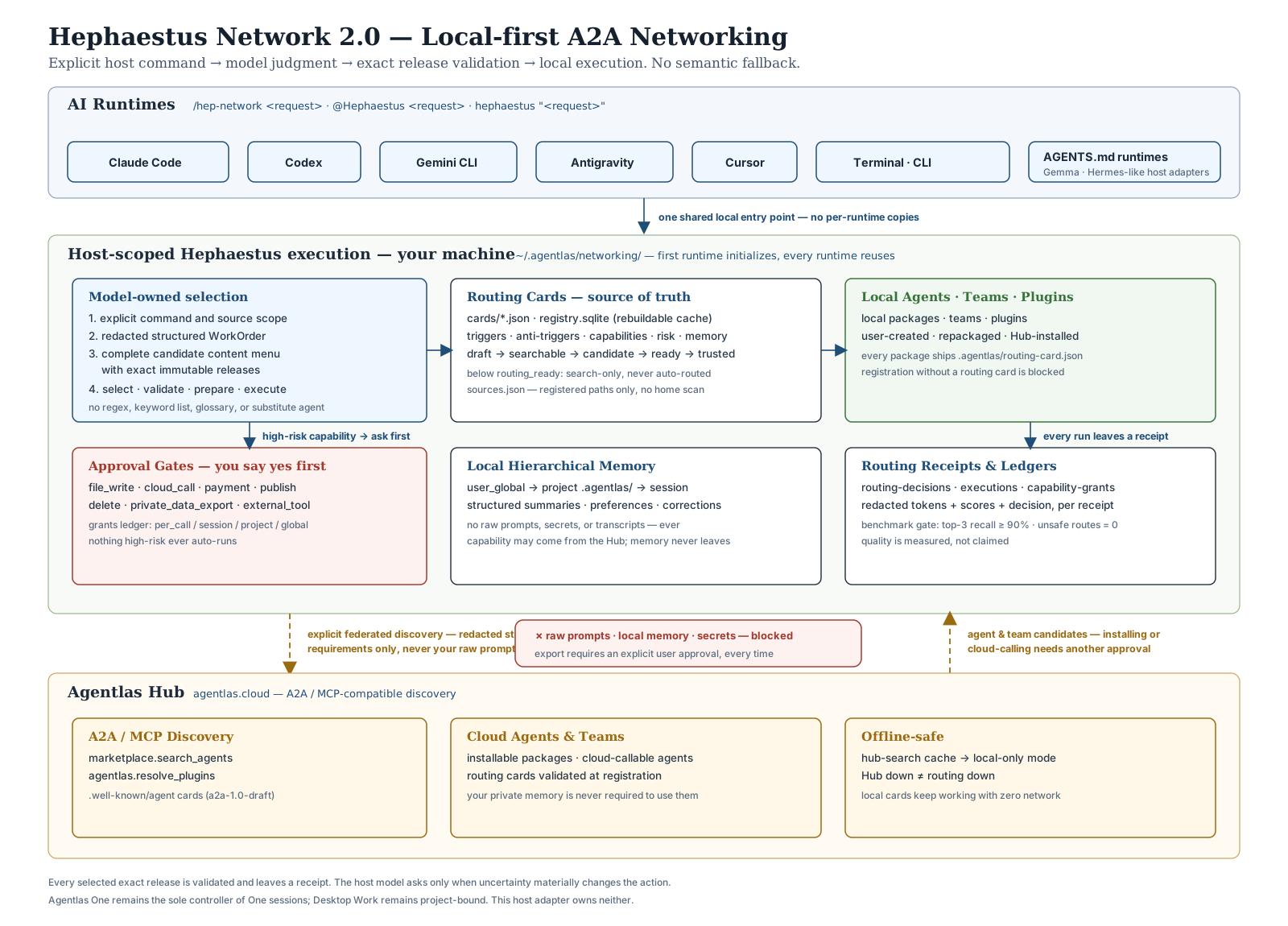
Figure 2. A2A scheduling: explicit host commands, model-selected exact releases, local memory, and federated Agentlas Network discovery.
- Typed Job Analysis: The active host LLM turns the request into a redacted
WorkOrderwith explicit roles, skills, tools, artifacts, authority, cardinality, and handoffs. Core does not infer staffing intent from a substring list. - Exact Source Federation:
local,cloud, andhubare exact scopes;networkis their sealed union. Each source returns a bounded, content-only menu, and Core records unavailable sources instead of silently widening scope. - Host-Owned Task Forces: The host LLM reads the qualification evidence and authors the exact
Selection. Core never chooses a deterministic winner or performs a hidden Router Agent re-rank; it validates governance, privacy, identity, cardinality, and graph integrity. - Pinned Execution: After validation, Core fetches only the selected immutable releases from their original source sessions and verifies release, package, and content digests before distinct planner, worker, synthesis, and verifier invocations run.
- Evidence-Scored Evaluation: Retrieval coverage, host selection, immutable preparation, real child invocations, and final verification are scored as separate claims. A benchmark result never replaces the host staffing decision or turns usage history into routing authority.
Execute a prepared goal from an external host
An explicitly selected host plugin or executable can run the newest ready plan bound to a Workforce goal through the provider-neutral adapter contract:
./bin/hephaestus workforce execute \
  --project . \
  --goal-id <host-task-id> \
  --adapter-argv-json '["/absolute/path/to/host-adapter"]'
The adapter reads one versioned JSON request from standard input and writes one
JSON response to standard output for inventory observation and each required
orchestrator, planner, worker, synthesis, and verifier invocation. Core retains
the exact preparation pins, verifies and snapshots output artifacts locally,
and returns an execution receipt only after the existing receipt validator
accepts the complete run. The adapter owns its provider authentication and
native runtime configuration as an independently installed plugin; do not put
credentials in the argv JSON. The complete v1 request, response, artifact, and
failure contract is documented in
agentlas_cloud/workforce/host_executor.py.
Tool inventory distinguishes native host enforcement (host-native) from a
host-owned tool dispatcher (host-broker). A bound tool requires its invocation
receipt to use that same enforcement path; neither label grants authority to a
package that did not select the host permission policy.
What It Builds, process packaging
Hephaestus packages agents into a standard directory layout that any workspace runtime can parse, install, verify, and run. The important part is not just agent.md; it is the operating contract around it. The layout below is what package-contract.json requires and hephaestus contract verify checks:
├── AGENTS.md                         # Package entry: name, purpose, canonical command, roles
├── agent.md                          # Primary instructions: role, steps, output contract
├── agentlas.json                     # Manifest: permissions, memory policy, read allow/deny lists
├── agents/<role>/agent.md            # Team only: one folder per worker
├── A2A/agent-card.a2a.json           # A2A Agent Card projected from the two cards below
├── .agentlas/
│   ├── agent-card.json               # Identity: name, slug, summary, capabilities, entrypoints
│   ├── routing-card.json             # Triggers and anti-triggers (ko + en), risk, memory behavior
│   ├── build-profile.json            # Fail-closed build readiness profile
│   ├── memory-map.json               # Memory ownership map
│   ├── global-commands.json          # Per-runtime slash command adapters
│   ├── mcp-policy.json               # What the machine must provide, and what happens without it
│   ├── skill-registry.json           # Skill inventory (may be empty)
│   ├── memory-tickets.jsonl          # Candidate memory events before curator promotion
│   ├── capability-eval-plan.json     # Positive/negative eval prompts with pass criteria
│   ├── routing-benchmarks.jsonl      # At least 10 route/reject cases, ko + en
│   ├── work-brief.json               # Interview-derived goal, constraints, decisions
│   ├── company-blueprint.json        # Team only: orchestrator, nodes, edges
│   ├── sitemap.json                  # Team only: what each task produces and consumes
│   └── brief.json                    # agentlas.brief/1 resume, compiled at upload
├── contracts/                        # intake.schema.json, output.schema.json, output.example.json
├── docs/                             # Builder interview, research sources, tool selection,
│                                     #   domain synthesis, prompt performance contract
├── tools/requirements.yaml           # Projected from mcp-policy.json + agentlas.json
├── permissions/policy.yaml           # Projected shell/network/file/payment whitelist
├── hooks/                            # memory-upgrade.yaml, on_stop.yaml, declared, host-enforced
├── evals/README.md                   # Points at the eval plan and routing benchmarks
└── .claude/skills/<name>/SKILL.md    # Skills, when the package carries any
docs/, the eval plan and the work brief may be skipped only by a
user-confirmed minimal private build. provenance.json, knowledge/,
schemas/, sandbox/ and examples/ are optional.
That package shape is why an Agentlas agent is more than an LLM-written role prompt. It carries routing, memory, input/output contracts, permissions, runtime adapters and evaluation evidence together.
Public safety boundary
This repository does not include Agentlas billing/account logic, production cloud credentials, customer databases, raw private transcripts, native keychain managers, or private deployment scripts.
Public output packages compiled by Hephaestus must exclude local absolute paths, API keys, service-account keys, .env secrets, raw transcripts, customer logs, or private developer notes.
Build telemetry
When build-telemetry is enabled, hep-build sends anonymous counters: a random
install id generated locally, which build step ran, whether it succeeded, a
machine error code, a duration, and the OS/engine/python versions. Events are
deleted 180 days after they arrive.
Never sent: file paths, package names, prompts, agent content, error message text, usernames, emails, or environment variables. The allowlist is enforced in the engine before the request is built and again on the server, which drops every field it does not recognize.
Telemetry is off by default. Enable or disable it with:
~/.agentlas/os-bin/agentlas-os features on build-telemetry
~/.agentlas/os-bin/agentlas-os features off build-telemetry
These environment variables also disable telemetry:
export AGENTLAS_TELEMETRY=0
export DO_NOT_TRACK=1     # the cross-vendor convention, honored here
Or permanently, in ~/.agentlas/networking/config.json:
{ "telemetry": false, "telemetrySetBy": "user" }
The telemetrySetBy marker is what separates a choice you made from the
"telemetry": false that default_config() wrote into every install created
before the key was ever read, that value never represented anyone's decision,
so it is not treated as one.
License
Apache-2.0 · Made by Appbridge