GitHub Pages Action






[!NOTE]
See also the GitHub official GitHub Pages Action first.
This is a GitHub Action to deploy your static files to GitHub Pages. This deploy action can be combined simply and freely with Static Site Generators. (Hugo, MkDocs, Gatsby, mdBook, Next, Nuxt, and so on.)
The next example step will deploy ./public directory to the remote gh-pages branch.
- name: Deploy
  uses: peaceiris/actions-gh-pages@v4
  with:
    github_token: ${{ secrets.GITHUB_TOKEN }}
    publish_dir: ./public
For newbies of GitHub Actions:
Note that the GITHUB_TOKEN is NOT a personal access token.
A GitHub Actions runner automatically creates a GITHUB_TOKEN secret to authenticate in your workflow.
So, you can start to deploy immediately without any configuration.
Supported Tokens
Three tokens are supported.
| Token | Private repo | Public repo | Protocol | Setup |
|---|---|---|---|---|
github_token |
✅️ | ✅️ | HTTPS | Unnecessary |
deploy_key |
✅️ | ✅️ | SSH | Necessary |
personal_token |
✅️ | ✅️ | HTTPS | Necessary |
Notes: Actually, the GITHUB_TOKEN works for deploying to GitHub Pages but it has still some limitations.
For the first deployment, we need to select the gh-pages branch or another branch on the repository settings tab.
See First Deployment with GITHUB_TOKEN
Supported Platforms
All Actions runners: Linux (Ubuntu), macOS, and Windows are supported.
| runs-on | github_token |
deploy_key |
personal_token |
|---|---|---|---|
| ubuntu-22.04 | ✅️ | ✅️ | ✅️ |
| ubuntu-20.04 | ✅️ | ✅️ | ✅️ |
| ubuntu-latest | ✅️ | ✅️ | ✅️ |
| macos-latest | ✅️ | ✅️ | ✅️ |
| windows-latest | ✅️ | (2) | ✅️ |
- WIP, See Issue #87
GitHub Enterprise Server Support
✅️ GitHub Enterprise Server is supported above 2.22.6.
Note that the GITHUB_TOKEN that is created by the runner might not inherently have push/publish privileges on GHES. You might need to create/request a technical user with write permissions to your target repository.
Table of Contents
- Getting started
- Options
- ⭐️ Set Runner's Access Token
github_token - ⭐️ Set SSH Private Key
deploy_key - ⭐️ Set Personal Access Token
personal_token - ⭐️ Set Another GitHub Pages Branch
publish_branch - ⭐️ Source Directory
publish_dir - ⭐️ Deploy to Subdirectory
destination_dir - ⭐️ Filter publishing assets
exclude_assets - ⭐️ Add CNAME file
cname - ⭐️ Enable Built-in Jekyll
enable_jekyll - ⭐️ Allow empty commits
allow_empty_commit - ⭐️ Keeping existing files
keep_files - ⭐️ Deploy to external repository
external_repository - ⭐️ Force orphan
force_orphan - ⭐️ Set Git username and email
- ⭐️ Set custom commit message
- ⭐️ Create Git tag
- ⭐️ Set Runner's Access Token
- Tips and FAQ
- Examples
- License
- Maintainer
Getting started
Add your workflow file .github/workflows/gh-pages.yml and push it to your remote default branch.
Here is an example workflow for Hugo.
name: GitHub Pages

on:
  push:
    branches:
      - main  # Set a branch name to trigger deployment
  pull_request:

jobs:
  deploy:
    runs-on: ubuntu-22.04
    permissions:
      contents: write
    concurrency:
      group: ${{ github.workflow }}-${{ github.ref }}
    steps:
      - uses: actions/checkout@v4
        with:
          submodules: true  # Fetch Hugo themes (true OR recursive)
          fetch-depth: 0    # Fetch all history for .GitInfo and .Lastmod

      - name: Setup Hugo
        uses: peaceiris/actions-hugo@v2
        with:
          hugo-version: '0.110.0'

      - name: Build
        run: hugo --minify

      - name: Deploy
        uses: peaceiris/actions-gh-pages@v4
        # If you're changing the branch from main,
        # also change the `main` in `refs/heads/main`
        # below accordingly.
        if: github.ref == 'refs/heads/main'
        with:
          github_token: ${{ secrets.GITHUB_TOKEN }}
          publish_dir: ./public
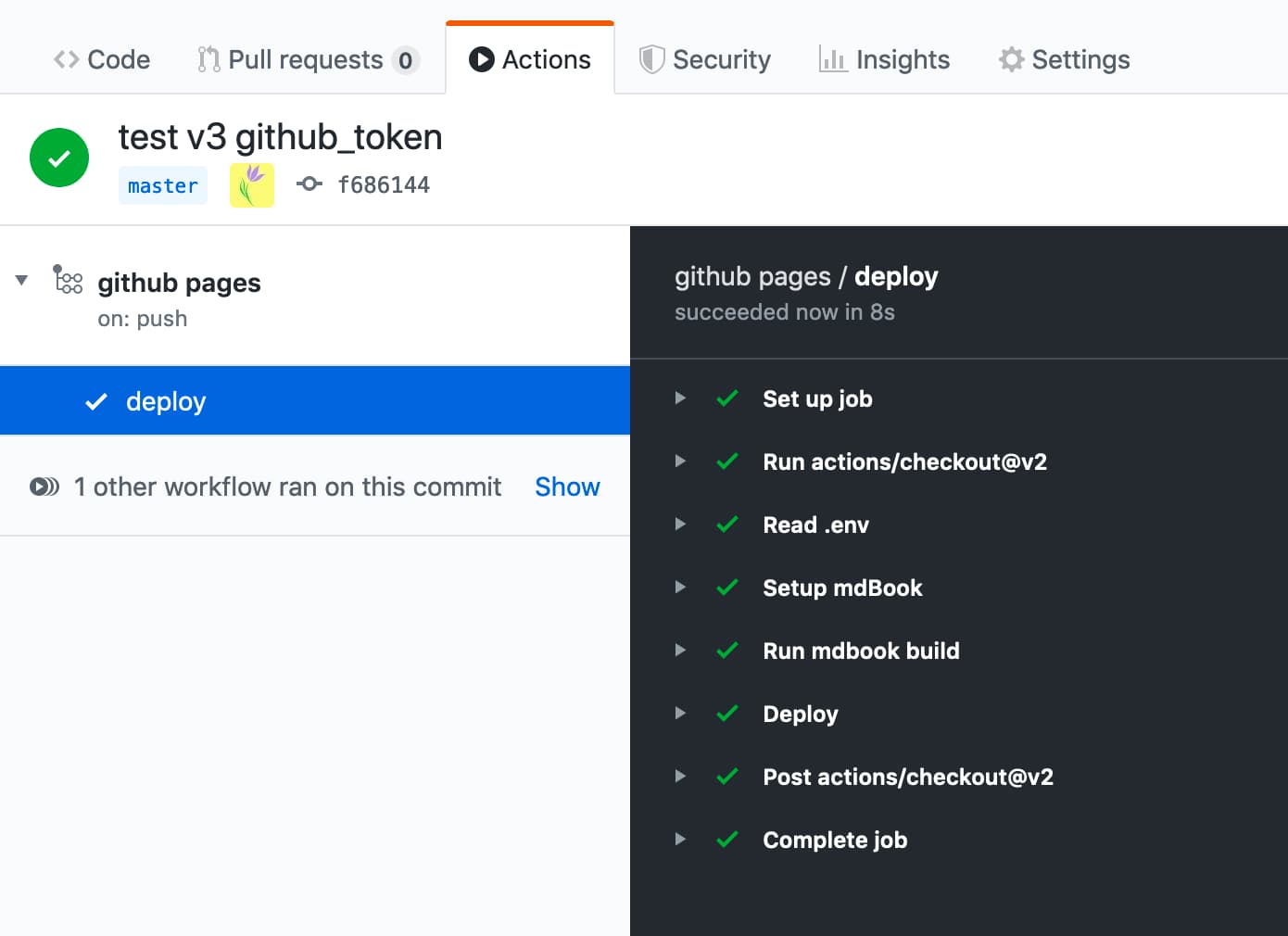
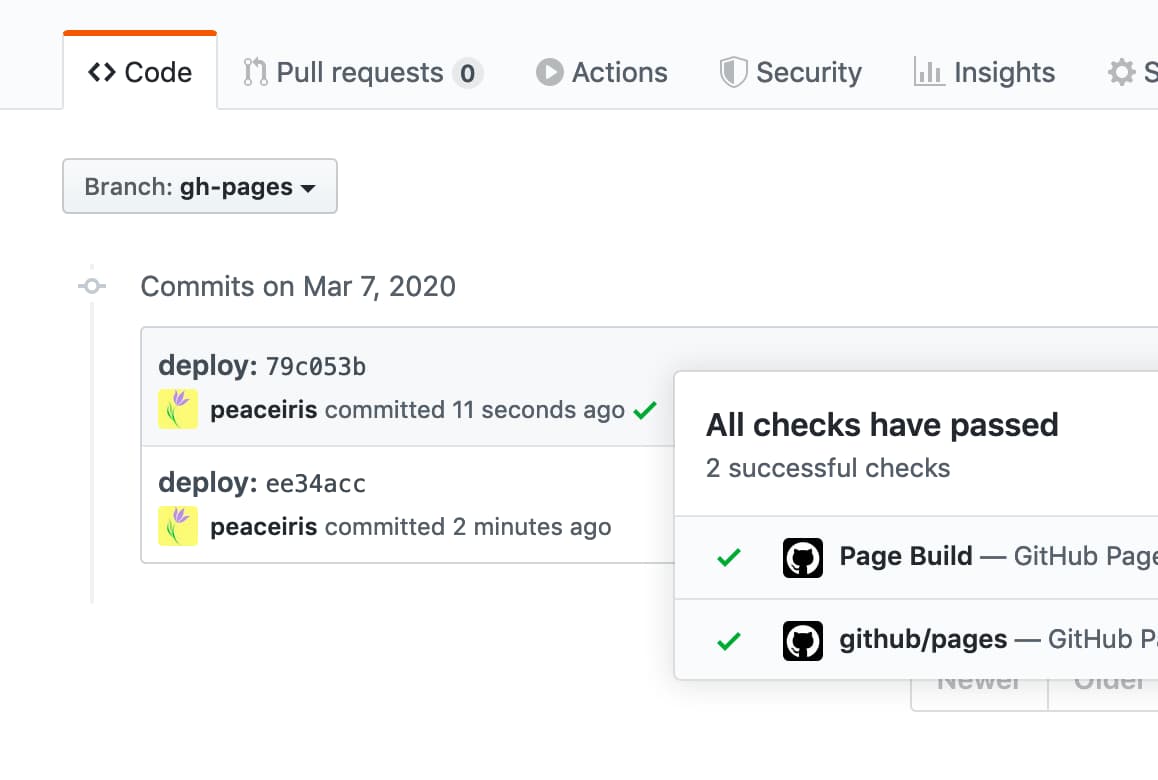
| Actions log overview | GitHub Pages log |
|---|---|
 |
 |
Options
⭐️ Set Runner's Access Token github_token
This option is for GITHUB_TOKEN, not a personal access token.
A GitHub Actions runner automatically creates a GITHUB_TOKEN secret to use in your workflow. You can use the GITHUB_TOKEN to authenticate in a workflow run.
- name: Deploy
  uses: peaceiris/actions-gh-pages@v4
  with:
    github_token: ${{ secrets.GITHUB_TOKEN }}
    publish_dir: ./public
For more details about GITHUB_TOKEN: Automatic token authentication - GitHub Docs
⭐️ Set SSH Private Key deploy_key
Read Create SSH Deploy Key, create your SSH deploy key, and set the deploy_key option like the following.
- name: Deploy
  uses: peaceiris/actions-gh-pages@v4
  with:
    deploy_key: ${{ secrets.ACTIONS_DEPLOY_KEY }}
    publish_dir: ./public
⭐️ Set Personal Access Token personal_token
Generate a personal access token (repo) and add it to Secrets as PERSONAL_TOKEN, it works as well as ACTIONS_DEPLOY_KEY.
- name: Deploy
  uses: peaceiris/actions-gh-pages@v4
  with:
    personal_token: ${{ secrets.PERSONAL_TOKEN }}
    publish_dir: ./public
⭐️ Set Another GitHub Pages Branch publish_branch
Set a branch name to use as GitHub Pages branch.
The default is gh-pages.
- name: Deploy
  uses: peaceiris/actions-gh-pages@v4
  with:
    github_token: ${{ secrets.GITHUB_TOKEN }}
    publish_branch: your-branch  # default: gh-pages
⭐️ Source Directory publish_dir
A source directory to deploy to GitHub Pages. The default is public.
Only the contents of this dir are pushed to GitHub Pages branch, gh-pages by default.
- name: Deploy
  uses: peaceiris/actions-gh-pages@v4
  with:
    github_token: ${{ secrets.GITHUB_TOKEN }}
    publish_dir: ./out  # default: public
⭐️ Deploy to Subdirectory destination_dir
This feature is on beta. Any feedback is welcome at Issue #324
A destination subdirectory on a publishing branch. The default is empty.
- name: Deploy
  uses: peaceiris/actions-gh-pages@v4
  with:
    github_token: ${{ secrets.GITHUB_TOKEN }}
    destination_dir: subdir
⭐️ Filter publishing assets exclude_assets
This feature is on beta. Any feedback is welcome at Issue #163
Set files or directories to exclude from publishing assets.
The default is .github.
Values should be split with a comma.
- name: Deploy
  uses: peaceiris/actions-gh-pages@v4
  with:
    github_token: ${{ secrets.GITHUB_TOKEN }}
    exclude_assets: '.github,exclude-file1,exclude-file2'
Set exclude_assets to empty for including the .github directory to deployment assets.
- name: Deploy
  uses: peaceiris/actions-gh-pages@v4
  with:
    deploy_key: ${{ secrets.ACTIONS_DEPLOY_KEY }}   # Recommended for this usage
    # personal_token: ${{ secrets.PERSONAL_TOKEN }} # An alternative
    # github_token: ${{ secrets.GITHUB_TOKEN }}     # This does not work for this usage
    exclude_assets: ''
The exclude_assets option supports glob patterns.
- name: Deploy
  uses: peaceiris/actions-gh-pages@v4
  with:
    github_token: ${{ secrets.GITHUB_TOKEN }}
    exclude_assets: '.github,exclude-file.txt,exclude-dir/**.txt'
⭐️ Add CNAME file cname
To add the CNAME file, we can set the cname option.
Alternatively, put your CNAME file into your publish_dir. (e.g. public/CNAME)
For more details about the CNAME file, read the official documentation: Managing a custom domain for your GitHub Pages site - GitHub Docs
- name: Deploy
  uses: peaceiris/actions-gh-pages@v4
  with:
    github_token: ${{ secrets.GITHUB_TOKEN }}
    publish_dir: ./public
    cname: github.com
⭐️ Enable Built-in Jekyll enable_jekyll
If you want GitHub Pages to process your site with the static site generator Jekyll, set enable_jekyll to true.
By default, this action signals to GitHub Pages that the site shall not be processed with Jekyll. This is done by adding an empty .nojekyll file on your publishing branch. When that file already exists, this action does nothing.
Bypassing Jekyll makes the deployment faster and is necessary if you are deploying files or directories that start with underscores, since Jekyll considers these to be special resources and does not copy them to the final site. You only need to set enable_jekyll to true when you want to deploy a Jekyll-powered website and let GitHub Pages do the Jekyll processing.
- name: Deploy
  uses: peaceiris/actions-gh-pages@v4
  with:
    github_token: ${{ secrets.GITHUB_TOKEN }}
    publish_dir: ./public
    enable_jekyll: true
For more details about .nojekyll: Bypassing Jekyll on GitHub Pages - The GitHub Blog
⭐️ Allow empty commits allow_empty_commit
By default, a commit will not be generated when no file changes. If you want to allow an empty commit, set the optional parameter allow_empty_commit to true.
For example:
- name: Deploy
  uses: peaceiris/actions-gh-pages@v4
  with:
    github_token: ${{ secrets.GITHUB_TOKEN }}
    publish_dir: ./public
    allow_empty_commit: true
⭐️ Keeping existing files keep_files
By default, existing files in the publish branch (or only in destination_dir if given) will be removed. If you want the action to add new files but leave existing ones untouched, set the optional parameter keep_files to true.
Note that users who are using a Static Site Generator do not need this option in most cases. Please reconsider your project structure and building scripts, or use a built-in feature of a Static Site Generator before you enable this flag.
For example:
- name: Deploy
  uses: peaceiris/actions-gh-pages@v4
  with:
    github_token: ${{ secrets.GITHUB_TOKEN }}
    publish_dir: ./public
    keep_files: true
With the v3, this option does not support working with the force_orphan option. The next major release (version 4) will support this. See the issue #455
⭐️ Deploy to external repository external_repository
By default, your files are published to the repository which is running this action.
If you want to publish to another repository on GitHub, set the environment variable external_repository to /.
For example:
- name: Deploy
  uses: peaceiris/actions-gh-pages@v4
  with:
    deploy_key: ${{ secrets.ACTIONS_DEPLOY_KEY }}
    external_repository: username/external-repository
    publish_branch: your-branch  # default: gh-pages
    publish_dir: ./public
You can use deploy_key or personal_token.
When you use deploy_key, set your private key to the repository which includes this action and set your public key to your external repository.
Note that GITHUB_TOKEN has no permission to access to external repositories. Please create a personal access token and set it to personal_token like personal_token: ${{ secrets.PERSONAL_TOKEN }}.
Use case:
A GitHub Free Plan account cannot use the GitHub Pages in a private repository. To make your source contents private and deploy it with the GitHub Pages, you can deploy your site from a private repository to a public repository using this option.
peaceiris/homepage: A private repository running this action withexternal_repository: peaceiris/peaceiris.github.iopeaceiris/peaceiris.github.io: A public repository using GitHub Pages
⭐️ Force orphan force_orphan
We can set the force_orphan: true option.
This allows you to make your publish branch with only the latest commit.
- name: Deploy
  uses: peaceiris/actions-gh-pages@v4
  with:
    github_token: ${{ secrets.GITHUB_TOKEN }}
    publish_dir: ./public
    force_orphan: true
⭐️ Set Git username and email
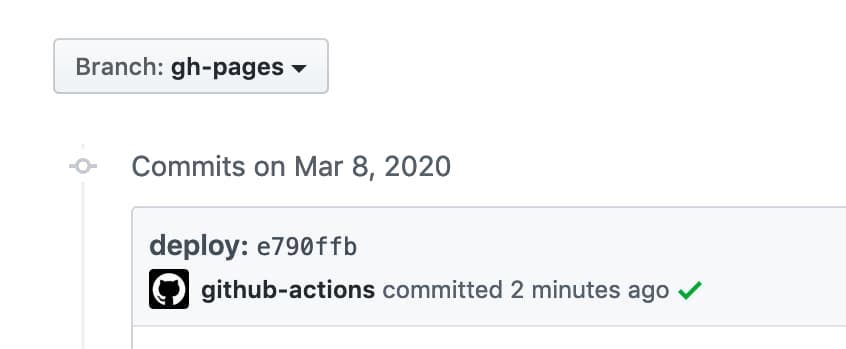
Set custom git config user.name and git config user.email.
A commit is always created with the same user.
- name: Deploy
  uses: peaceiris/actions-gh-pages@v4
  with:
    github_token: ${{ secrets.GITHUB_TOKEN }}
    publish_dir: ./public
    user_name: 'github-actions[bot]'
    user_email: 'github-actions[bot]@users.noreply.github.com'
⭐️ Set custom commit message
Set a custom commit message.
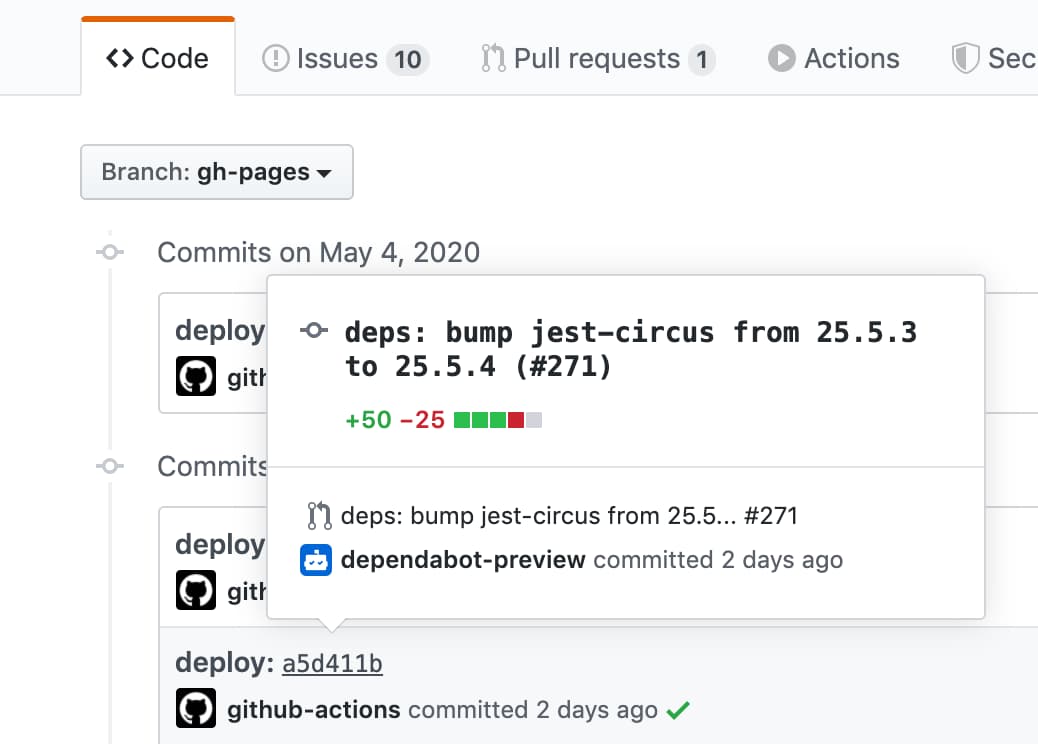
When we create a commit with a message docs: Update some post, a deployment commit will be generated with a message docs: Update some post ${GITHUB_SHA}.
- name: Deploy
  uses: peaceiris/actions-gh-pages@v4
  with:
    github_token: ${{ secrets.GITHUB_TOKEN }}
    publish_dir: ./public
    commit_message: ${{ github.event.head_commit.message }}
To set a full custom commit message without a triggered commit hash,
use the full_commit_message option instead of the commit_message option.
- name: Deploy
  uses: peaceiris/actions-gh-pages@v4
  with:
    github_token: ${{ secrets.GITHUB_TOKEN }}
    publish_dir: ./public
    full_commit_message: ${{ github.event.head_commit.message }}
⭐️ Create Git tag
Here is an example workflow.
name: GitHub Pages

on:
  push:
    branches:
      - main
    tags:
      - 'v*.*.*'

jobs:
  deploy:
    runs-on: ubuntu-22.04
    permissions:
      contents: write
    concurrency:
      group: ${{ github.workflow }}-${{ github.ref }}
    steps:
      - uses: actions/checkout@v4

      - name: Some build

      - name: Prepare tag
        id: prepare_tag
        if: startsWith(github.ref, 'refs/tags/')
        run: |
          echo "DEPLOY_TAG_NAME=deploy-${TAG_NAME}" >> "${GITHUB_OUTPUT}"

      - name: Deploy
        uses: peaceiris/actions-gh-pages@v4
        with:
          github_token: ${{ secrets.GITHUB_TOKEN }}
          publish_dir: ./public
          tag_name: ${{ steps.prepare_tag.outputs.DEPLOY_TAG_NAME }}
          tag_message: 'Deployment ${{ github.ref_name }}'
Commands on a local machine.
$ # On a main branch
$ git tag -a "v1.2.3" -m "Release v1.2.3"
$ git push origin "v1.2.3"

$ # After deployment
$ git fetch origin
$ git tag
deploy-v1.2.3  # Tag on the gh-pages branch
v1.2.3         # Tag on the main branch
Tips and FAQ
⭐️ Create SSH Deploy Key
Generate your deploy key with the following command.
ssh-keygen -t rsa -b 4096 -C "$(git config user.email)" -f gh-pages -N ""
You will get 2 files:
gh-pages.pubis a public keygh-pagesis a private key
Next, Go to Repository Settings
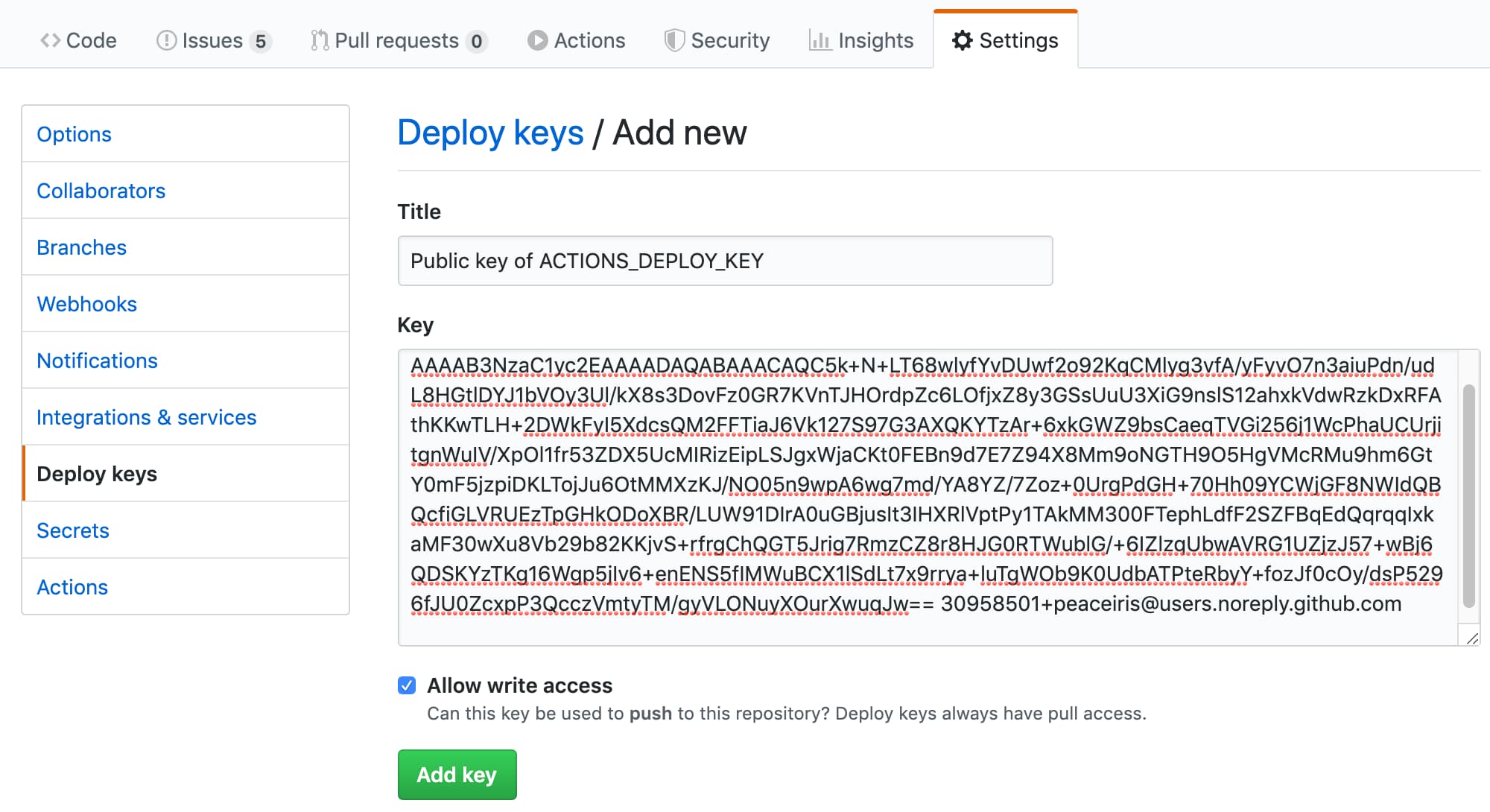
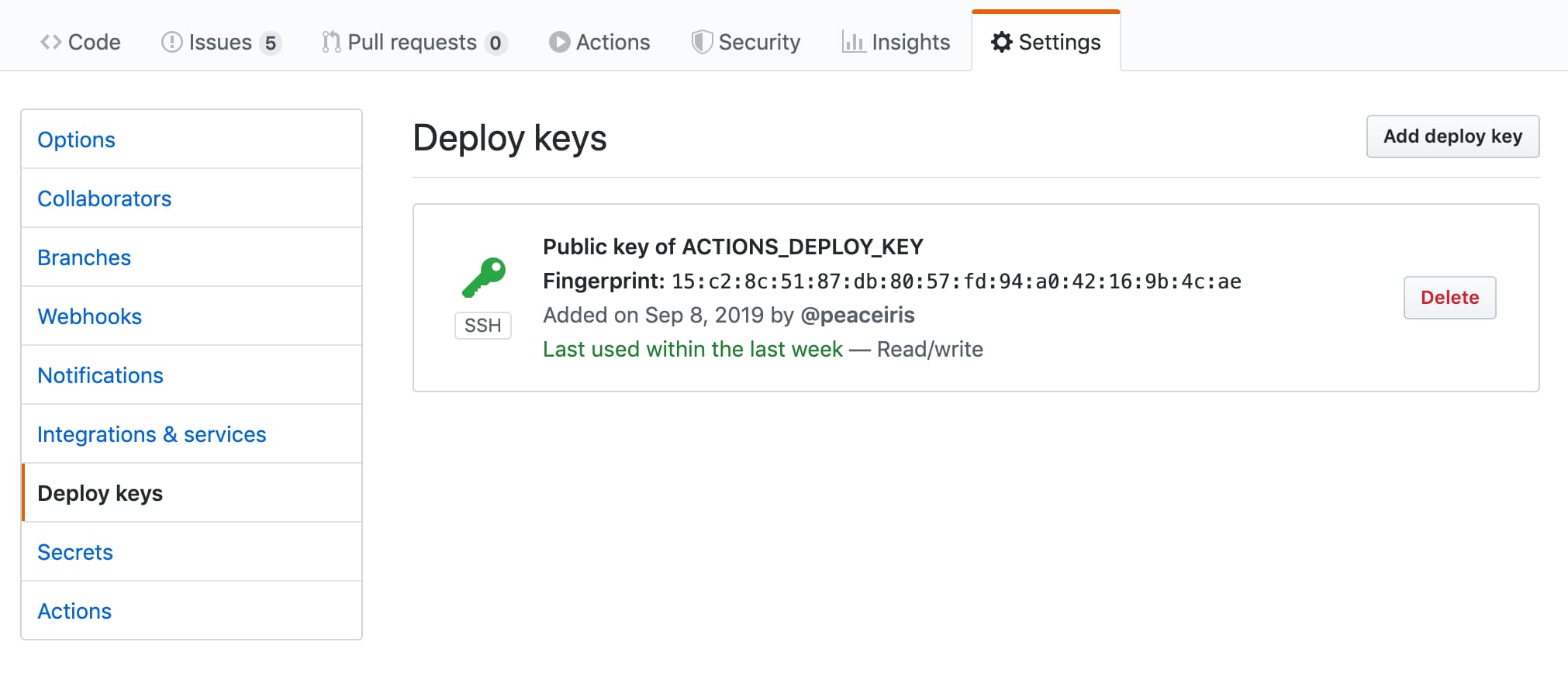
- Go to Deploy Keys and add your public key with the Allow write access
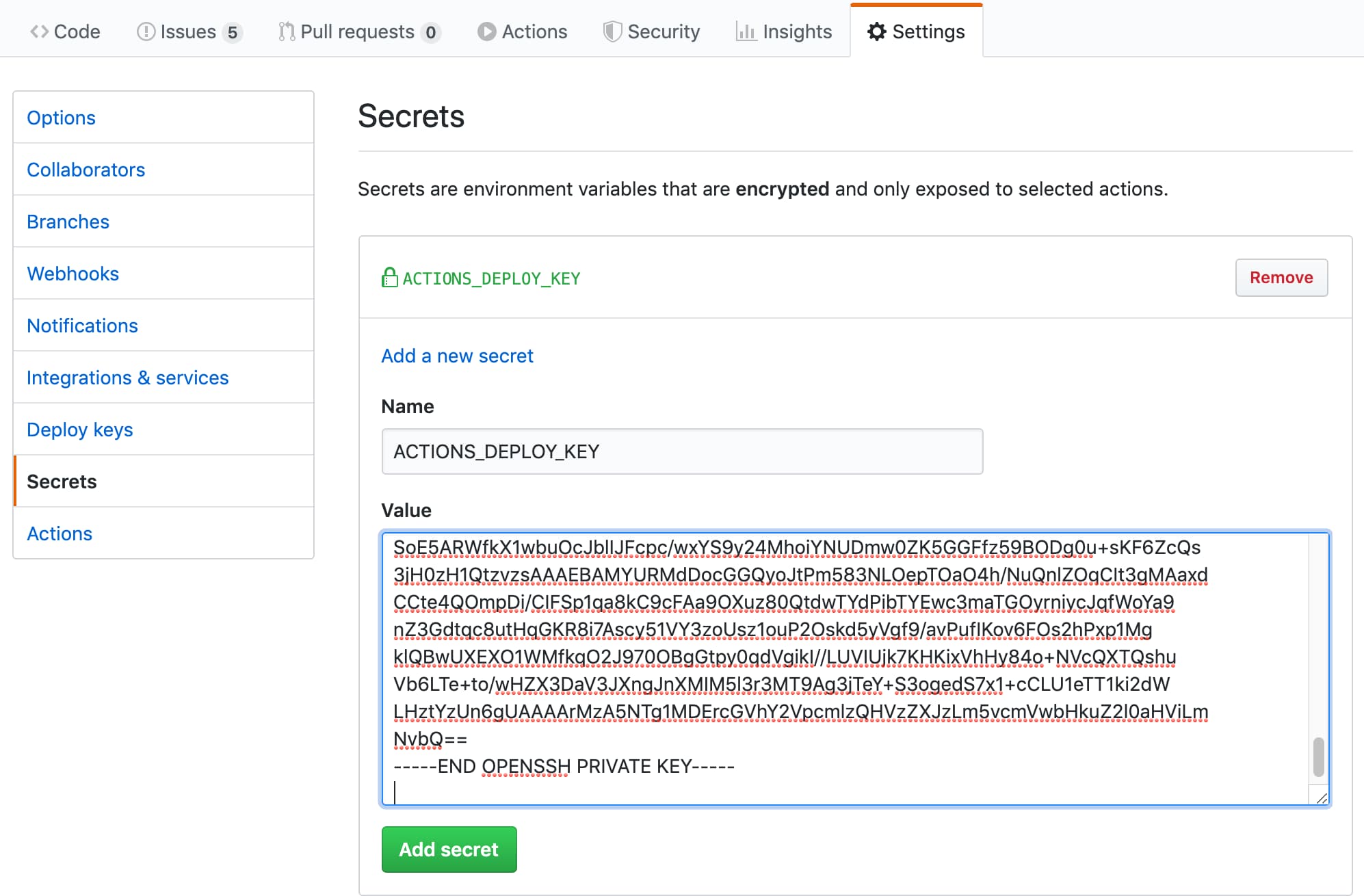
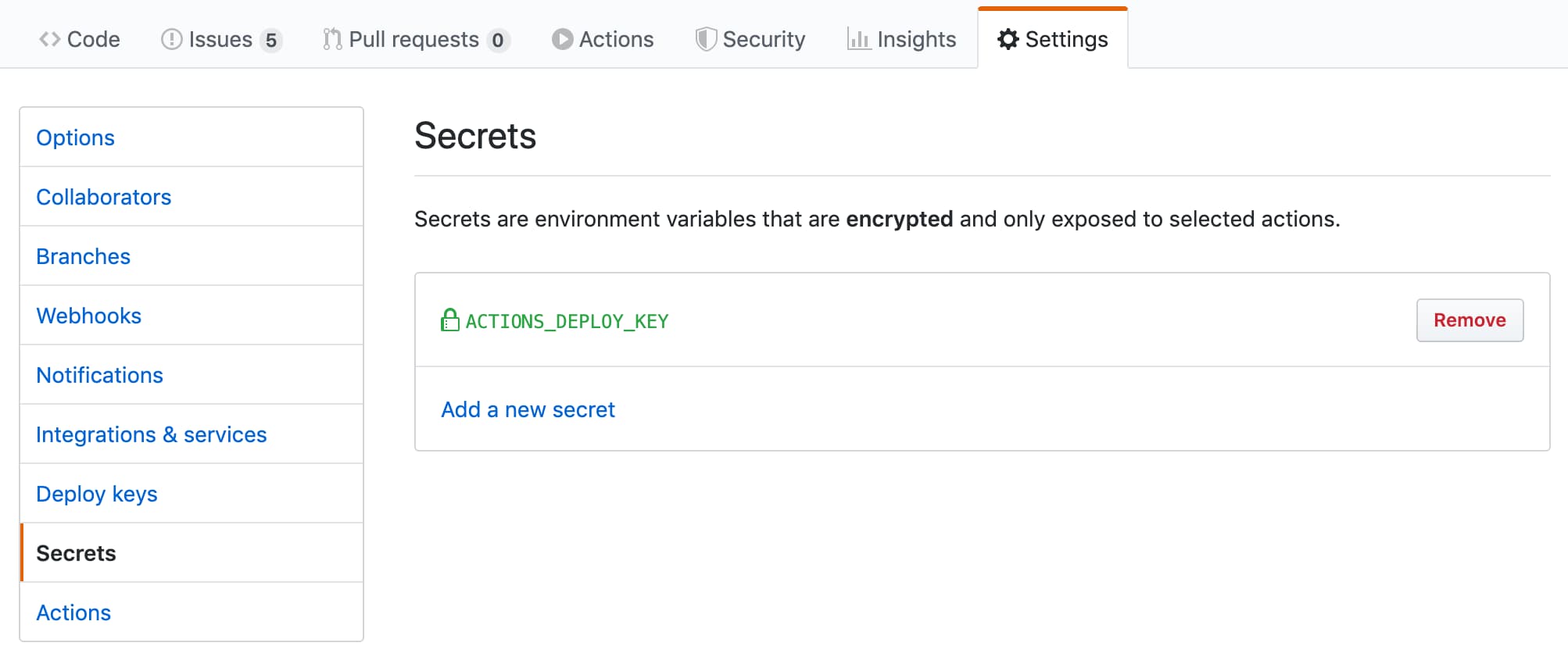
- Go to Secrets and add your private key as
ACTIONS_DEPLOY_KEY
| Add your public key | Success |
|---|---|
 |
 |
| Add your private key | Success |
|---|---|
 |
 |
⭐️ First Deployment with GITHUB_TOKEN
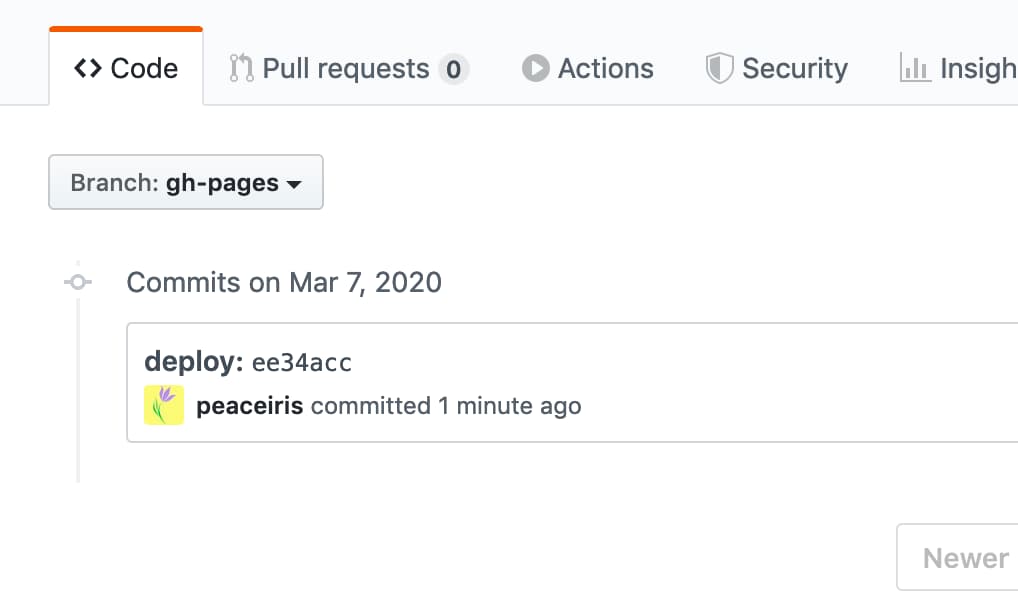
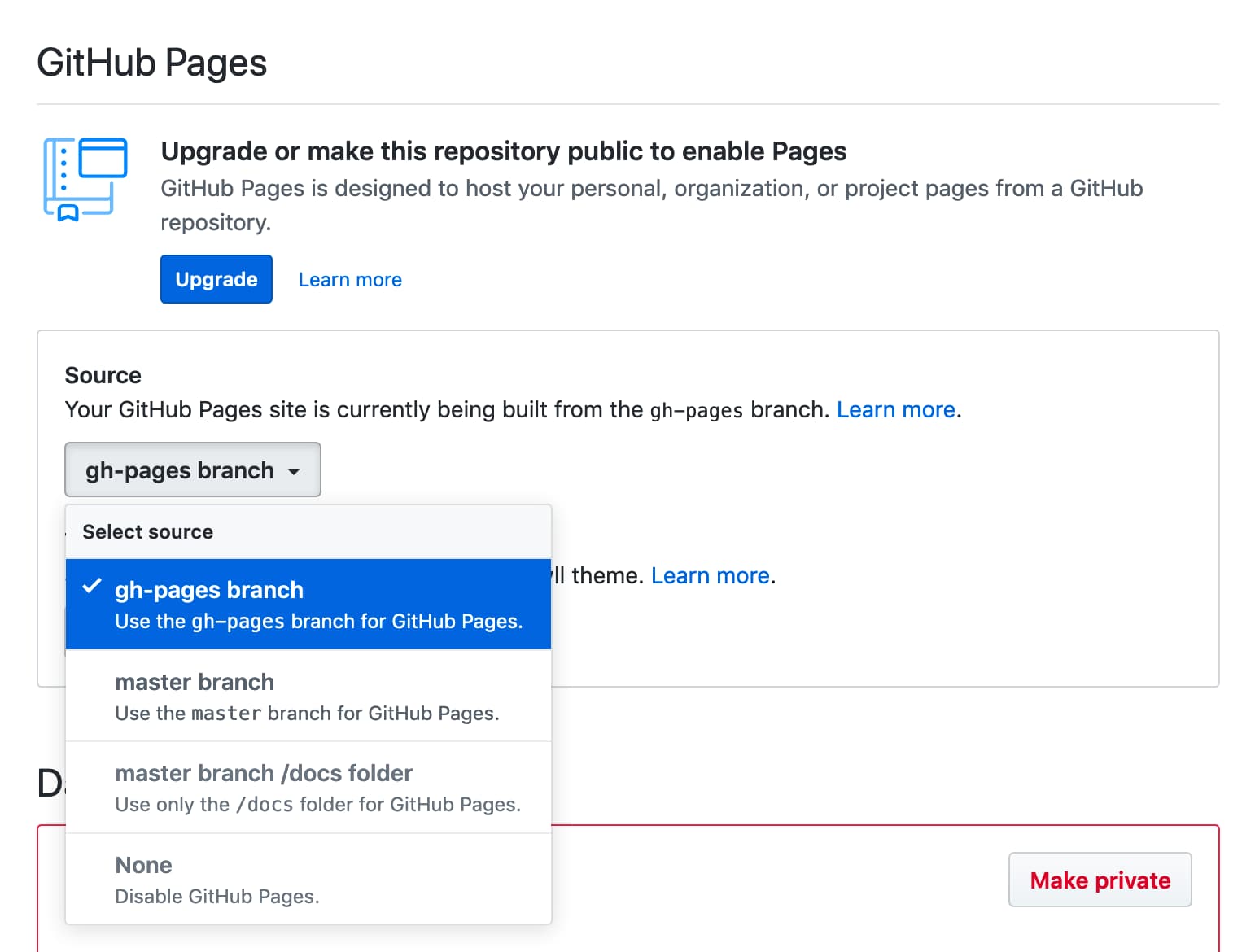
The GITHUB_TOKEN has limitations for the first deployment so we have to select the GitHub Pages branch on the repository settings tab. After that, do the second deployment like the following pictures.
| First deployment failed | Go to the settings tab |
|---|---|
 |
 |
| Select branch | Deploying again and succeed |
|---|---|
 |
|
If the action fails to push the commit or tag with the following error:
/usr/bin/git push origin gh-pages
remote: Write access to repository not granted.
fatal: unable to access 'https://github.com/username/repository.git/': The requested URL returned error: 403
Error: Action failed with "The process '/usr/bin/git' failed with exit code 128"
Please add the write permission to the permissions.contents in a workflow/job.
permissions:
  contents: write
Alternatively, you can configure the default GITHUB_TOKEN permissions by selecting read and write permissions.
⭐️ Use the latest and specific release
We recommend you to use the latest and specific release of this action for stable CI/CD. It is useful to watch this repository (release only) to check the latest release of this action.
For continuous updating, we can use the GitHub native Dependabot.
Here is an example configuration of the bot. The config file is located in .github/dependabot.yml.
version: 2
updates:
- package-ecosystem: "github-actions"
  directory: "/"
  schedule:
    interval: "daily"
  labels:
  - "CI/CD"
  commit-message:
    prefix: ci
See the official documentation for more details about the Dependabot: Keeping your dependencies updated automatically - GitHub Docs
⭐️ Schedule and Manual Deployment
For deploying regularly, we can set the on.schedule workflow trigger.
See Scheduled events | Events that trigger workflows - GitHub Docs
For deploying manually, we can set the on.workflow_dispatch workflow trigger.
See Manual events workflow_dispatch | Events that trigger workflows - GitHub Docs
name: GitHub Pages

on:
  push:
    branches:
      - main
  schedule:
    - cron: "22 22 * * *"
  workflow_dispatch:

jobs:
  deploy:
    runs-on: ubuntu-22.04
    permissions:
      contents: write
    concurrency:
      group: ${{ github.workflow }}-${{ github.ref }}
    steps:
    ...
⭐️ Release Strategy
Our project builds and provides build assets only when creating a release. This is to prevent the user from executing this action with a specific branch (like main). For example, if we maintain build assets in the main branch and users use this action as follows, a major release including breaking changes will break the CI workflow of the users silently.
- uses: peaceiris/actions-gh-pages@main # Bad example!
  with:
    github_token: ${{ secrets.GITHUB_TOKEN }}
    publish_dir: ./public
In this project, a major tag (e.g. v3) is guaranteed to contain no breaking changes. But, we recommend using a tag or a commit hash for the stability of your workflows.
- uses: peaceiris/actions-gh-pages@v4.0.0 # tag: Better
  with:
    github_token: ${{ secrets.GITHUB_TOKEN }}
    publish_dir: ./public
- uses: peaceiris/actions-gh-pages@373f7f263a76c20808c831209c920827a82a2847 # commit hash of v3.9.3: Best!
  with:
    github_token: ${{ secrets.GITHUB_TOKEN }}
    publish_dir: ./public
For verifying the release asset, we can use the following commands.
git clone https://github.com/peaceiris/actions-gh-pages.git
cd ./actions-gh-pages
git checkout v3.9.3
nvm install
nvm use
npm i -g npm
npm ci
npm run build
git diff ./lib/index.js # We will get zero exit code
Examples
⭐️ Static Site Generators with Node.js
hexo, vuepress, react-static, gridsome, create-react-app and so on.
Please check where your output directory is before pushing your workflow.
e.g. create-react-app requires publish_dir to be set to ./build
Premise: Dependencies are managed by package.json and package-lock.json
name: GitHub Pages

on:
  push:
    branches:
      - main
  pull_request:

jobs:
  deploy:
    runs-on: ubuntu-22.04
    permissions:
      contents: write
    concurrency:
      group: ${{ github.workflow }}-${{ github.ref }}
    steps:
      - uses: actions/checkout@v4

      - name: Setup Node
        uses: actions/setup-node@v4
        with:
          node-version: '24'

      - name: Cache dependencies
        uses: actions/cache@v4
        with:
          path: ~/.npm
          key: ${{ runner.os }}-node-${{ hashFiles('**/package-lock.json') }}
          restore-keys: |
            ${{ runner.os }}-node-

      - run: npm ci
      - run: npm run build

      - name: Deploy
        uses: peaceiris/actions-gh-pages@v4
        if: github.ref == 'refs/heads/main'
        with:
          github_token: ${{ secrets.GITHUB_TOKEN }}
          publish_dir: ./public
⭐️ Gatsby
An example for Gatsby (Gatsby.js) project with gatsby-starter-blog
name: GitHub Pages

on:
  push:
    branches:
      - main
  pull_request:

jobs:
  deploy:
    runs-on: ubuntu-22.04
    permissions:
      contents: write
    concurrency:
      group: ${{ github.workflow }}-${{ github.ref }}
    steps:
      - uses: actions/checkout@v4

      - name: Setup Node
        uses: actions/setup-node@v4
        with:
          node-version: '24'

      - name: Cache dependencies
        uses: actions/cache@v4
        with:
          path: ~/.npm
          key: ${{ runner.os }}-node-${{ hashFiles('**/package-lock.json') }}
          restore-keys: |
            ${{ runner.os }}-node-

      - run: npm ci
      - run: npm run format
      - run: npm run test
      - run: npm run build

      - name: Deploy
        uses: peaceiris/actions-gh-pages@v4
        if: github.ref == 'refs/heads/main'
        with:
          github_token: ${{ secrets.GITHUB_TOKEN }}
          publish_dir: ./public
⭐️ React and Next
An example for Next.js (React.js) project with create-next-app
name: GitHub Pages

on:
  push:
    branches:
      - main
  pull_request:

jobs:
  deploy:
    runs-on: ubuntu-22.04
    permissions:
      contents: write
    concurrency:
      group: ${{ github.workflow }}-${{ github.ref }}
    steps:
      - uses: actions/checkout@v4

      - name: Setup Node
        uses: actions/setup-node@v4
        with:
          node-version: '24'

      - name: Get yarn cache
        id: yarn-cache
        run: echo "YARN_CACHE_DIR=$(yarn cache dir)" >> "${GITHUB_OUTPUT}"

      - name: Cache dependencies
        uses: actions/cache@v4
        with:
          path: ${{ steps.yarn-cache.outputs.YARN_CACHE_DIR }}
          key: ${{ runner.os }}-yarn-${{ hashFiles('**/yarn.lock') }}
          restore-keys: |
            ${{ runner.os }}-yarn-

      - run: yarn install --frozen-lockfile
      - run: yarn build
      - run: yarn export

      - name: Deploy
        uses: peaceiris/actions-gh-pages@v4
        if: github.ref == 'refs/heads/main'
        with:
          github_token: ${{ secrets.GITHUB_TOKEN }}
          publish_dir: ./out
⭐️ Vue and Nuxt
An example for Nuxt.js (Vue.js) project with create-nuxt-app
name: GitHub Pages

on:
  push:
    branches:
      - main
  pull_request:

jobs:
  deploy:
    runs-on: ubuntu-22.04
    permissions:
      contents: write
    concurrency:
      group: ${{ github.workflow }}-${{ github.ref }}
    steps:
      - uses: actions/checkout@v4

      - name: Setup Node
        uses: actions/setup-node@v4
        with:
          node-version: '24'

      - name: Cache dependencies
        uses: actions/cache@v4
        with:
          path: ~/.npm
          key: ${{ runner.os }}-node-${{ hashFiles('**/package-lock.json') }}
          restore-keys: |
            ${{ runner.os }}-node-

      - run: npm ci
      - run: npm test
      - run: npm run generate

      - name: deploy
        uses: peaceiris/actions-gh-pages@v4
        if: github.ref == 'refs/heads/main'
        with:
          github_token: ${{ secrets.GITHUB_TOKEN }}
          publish_dir: ./dist
⭐️ Docusaurus
An example workflow for Docusaurus.
npx @docusaurus/init@next init website classic is useful to create a new Docusaurus project.
# .github/workflows/deploy.yml

name: GitHub Pages

on:
  push:
    branches:
      - main
    paths:
      - '.github/workflows/deploy.yml'
      - 'website/**'
  pull_request:

jobs:
  deploy:
    runs-on: ubuntu-22.04
    permissions:
      contents: write
    concurrency:
      group: ${{ github.workflow }}-${{ github.ref }}
    defaults:
      run:
        working-directory: website
    steps:
      - uses: actions/checkout@v4

      - name: Setup Node
        uses: actions/setup-node@v4
        with:
          node-version: '24'

      - name: Get yarn cache
        id: yarn-cache
        run: echo "YARN_CACHE_DIR=$(yarn cache dir)" >> "${GITHUB_OUTPUT}"

      - name: Cache dependencies
        uses: actions/cache@v4
        with:
          path: ${{ steps.yarn-cache.outputs.YARN_CACHE_DIR }}
          key: ${{ runner.os }}-website-${{ hashFiles('**/yarn.lock') }}
          restore-keys: |
            ${{ runner.os }}-website-

      - run: yarn install --frozen-lockfile
      - run: yarn build

      - name: Deploy
        uses: peaceiris/actions-gh-pages@v4
        if: github.ref == 'refs/heads/main'
        with:
          github_token: ${{ secrets.GITHUB_TOKEN }}
          publish_dir: ./website/build
⭐️ Static Site Generators with Python
pelican, MkDocs, sphinx, and so on.
Premise: Dependencies are managed by requirements.txt
name: GitHub Pages

on:
  push:
    branches:
      - main
  pull_request:

jobs:
  deploy:
    runs-on: ubuntu-22.04
    permissions:
      contents: write
    concurrency:
      group: ${{ github.workflow }}-${{ github.ref }}
    steps:
      - uses: actions/checkout@v4

      - name: Setup Python
        uses: actions/setup-python@v5
        with:
          python-version: '3.13'

      - name: Upgrade pip
        run: |
          # install pip=>20.1 to use "pip cache dir"
          python3 -m pip install --upgrade pip

      - name: Get pip cache dir
        id: pip-cache
        run: echo "dir=$(pip cache dir)" >> $GITHUB_OUTPUT

      - name: Cache dependencies
        uses: actions/cache@v4
        with:
          path: ${{ steps.pip-cache.outputs.dir }}
          key: ${{ runner.os }}-pip-${{ hashFiles('**/requirements.txt') }}
          restore-keys: |
            ${{ runner.os }}-pip-

      - name: Install dependencies
        run: python3 -m pip install -r ./requirements.txt

      - run: mkdocs build

      - name: Deploy
        uses: peaceiris/actions-gh-pages@v4
        if: github.ref == 'refs/heads/main'
        with:
          github_token: ${{ secrets.GITHUB_TOKEN }}
          publish_dir: ./site
⭐️ mdBook (Rust)
An example GitHub Actions workflow to deploy rust-lang/mdBook site to GitHub Pages.
name: GitHub Pages

on:
  push:
    branches:
      - main
  pull_request:

jobs:
  deploy:
    runs-on: ubuntu-22.04
    permissions:
      contents: write
    concurrency:
      group: ${{ github.workflow }}-${{ github.ref }}
    steps:
      - uses: actions/checkout@v4

      - name: Setup mdBook
        uses: peaceiris/actions-mdbook@v1
        with:
          mdbook-version: '0.4.8'
          # mdbook-version: 'latest'

      - run: mdbook build

      - name: Deploy
        uses: peaceiris/actions-gh-pages@v4
        if: github.ref == 'refs/heads/main'
        with:
          github_token: ${{ secrets.GITHUB_TOKEN }}
          publish_dir: ./book
Hint: you may want to publish your rustdocs. And use relative links to it from the md docs, and have them checked by mdbook.
Then, according to the doc, you may put ./target/doc/
to your ./book/src dir before you mdbook build and then it will end up in ./book/html/ and in your Github Pages.
⭐️ Flutter Web
An example workflow for Flutter web project.
name: GitHub Pages

on:
  push:
    branches:
      - main
  pull_request:

jobs:
  deploy:
    runs-on: ubuntu-22.04
    permissions:
      contents: write
    concurrency:
      group: ${{ github.workflow }}-${{ github.ref }}
    steps:
      - uses: actions/checkout@v4

      - name: Setup Flutter
        run: |
          git clone https://github.com/flutter/flutter.git --depth 1 -b beta _flutter
          echo "${GITHUB_WORKSPACE}/_flutter/bin" >> ${GITHUB_PATH}

      - name: Install
        run: |
          flutter config --enable-web
          flutter pub get

      - name: Build
        run: flutter build web

      - name: Deploy
        uses: peaceiris/actions-gh-pages@v4
        if: github.ref == 'refs/heads/main'
        with:
          github_token: ${{ secrets.GITHUB_TOKEN }}
          publish_dir: ./build/web
⭐️ Elm
An example workflow for Elm.
name: GitHub Pages

on:
  push:
    branches:
      - main
  pull_request:

jobs:
  deploy:
    runs-on: ubuntu-22.04
    permissions:
      contents: write
    concurrency:
      group: ${{ github.workflow }}-${{ github.ref }}
    steps:
      - uses: actions/checkout@v4

      - name: Setup Node
        uses: actions/setup-node@v4
        with:
          node-version: '24'

      - name: Setup Elm
        run: npm install elm --global

      - name: Make
        run: elm make --optimize src/Main.elm

      - name: Move files
        run: |
          mkdir ./public
          mv ./index.html ./public/
        # If you have non-minimal setup with some assets and separate html/js files,
        # provide --output=<output-file> option for `elm make` and remove this step

      - name: Deploy
        uses: peaceiris/actions-gh-pages@v4
        if: github.ref == 'refs/heads/main'
        with:
          github_token: ${{ secrets.GITHUB_TOKEN }}
          publish_dir: ./public
⭐️ Swift Publish
An example workflow for JohnSundell/Publish.
name: GitHub Pages

on:
  push:
    branches:
      - main
  pull_request:

jobs:
  deploy:
    runs-on: macos-latest
    concurrency:
      group: ${{ github.workflow }}-${{ github.ref }}
    steps:
      - uses: actions/checkout@v4

      - uses: actions/cache@v4
        with:
          path: |
            ~/Publish_build
            .build
          key: ${{ runner.os }}-spm-${{ hashFiles('**/Package.resolved') }}
          restore-keys: |
            ${{ runner.os }}-spm-

      - name: Setup JohnSundell/Publish
        run: |
          cd ${HOME}
          export PUBLISH_VERSION="0.7.0"
          git clone https://github.com/JohnSundell/Publish.git
          cd ./Publish && git checkout ${PUBLISH_VERSION}
          mv ~/Publish_build .build || true
          swift build -c release
          cp -r .build ~/Publish_build || true
          echo "${HOME}/Publish/.build/release" >> ${GITHUB_PATH}

      - run: publish-cli generate

      - name: Deploy to GitHub Pages
        uses: peaceiris/actions-gh-pages@v4
        if: github.ref == 'refs/heads/main'
        with:
          github_token: ${{ secrets.GITHUB_TOKEN }}
          publish_dir: ./Output