


aaPanel is a free, open source server & vm management project written in JavaScript and released under a custom open-source licence. It has 3,058 GitHub stars, 762 forks and 92 open issues, and was last pushed 22 days ago. On this registry it ranks #7 of 10 tracked projects in Server & VM Management, with 5 head-to-head comparisons available. It gained 1 stars over the last 6 tracked days.

What is aaPanel?

What it is

aaPanel is a web-based hosting control panel for Linux servers, distributed from the aaPanel GitHub repository under the infrastructure and operations category. It is written in JavaScript and installs on top of an existing Linux operating system, where it presents a graphical interface for managing the web server rather than requiring administrators to edit configuration files by hand. The project sits in the Linux server-management ecosystem alongside the Apache, Nginx, MySQL, PHP and Docker tooling that it installs and administers. Its stated design goal is simplicity combined with power: a single panel that covers the day-to-day operations of a web host.

The concrete problem it solves is deployment time. Standing up a LAMP or LNMP environment normally means installing and configuring a web server, a database engine, a scripting runtime and any supporting software one component at a time. aaPanel collapses that work into one-click installs and exposes the resulting stack through a browser interface and a web terminal, so the operator spends time on their own project instead of on provisioning. It also gives the host a place to manage website data, database data and virtual host files from one screen.

Key capabilities

  • One-click installation of LNMP and LAMP development environments and supporting software.
  • Web-based GUI for managing the web server instead of editing configuration directly.
  • A web terminal for server management, aimed at improving operations and maintenance efficiency.
  • Administration of Apache, Nginx, MySQL and PHP from the panel.
  • Docker deployment through the official aapanel/aapanel:lib image.
  • Bundled phpMyAdmin for database work, served on port 888.
  • Defined storage locations for website data at /www/wwwroot, MySQL data at /www/server/data, and virtual host files at /www/server/panel/vhost.

Who uses it and how

  • Operations teams that manage Linux servers through the web terminal to raise maintenance efficiency.
  • Developers deploying a full LNMP or LAMP stack who want the environment installed in one step.
  • Self-hosters running the Docker image with volumes mounted from the host, for example ~/website_data:/www/wwwroot and ~/mysql_data:/www/server/data.
  • Administrators who need to reach the panel and
project readme (upstream, from github) — read inline
aaPanel
aaPanel

BTWAF social

Official | documentation | Demo |

About aaPanel

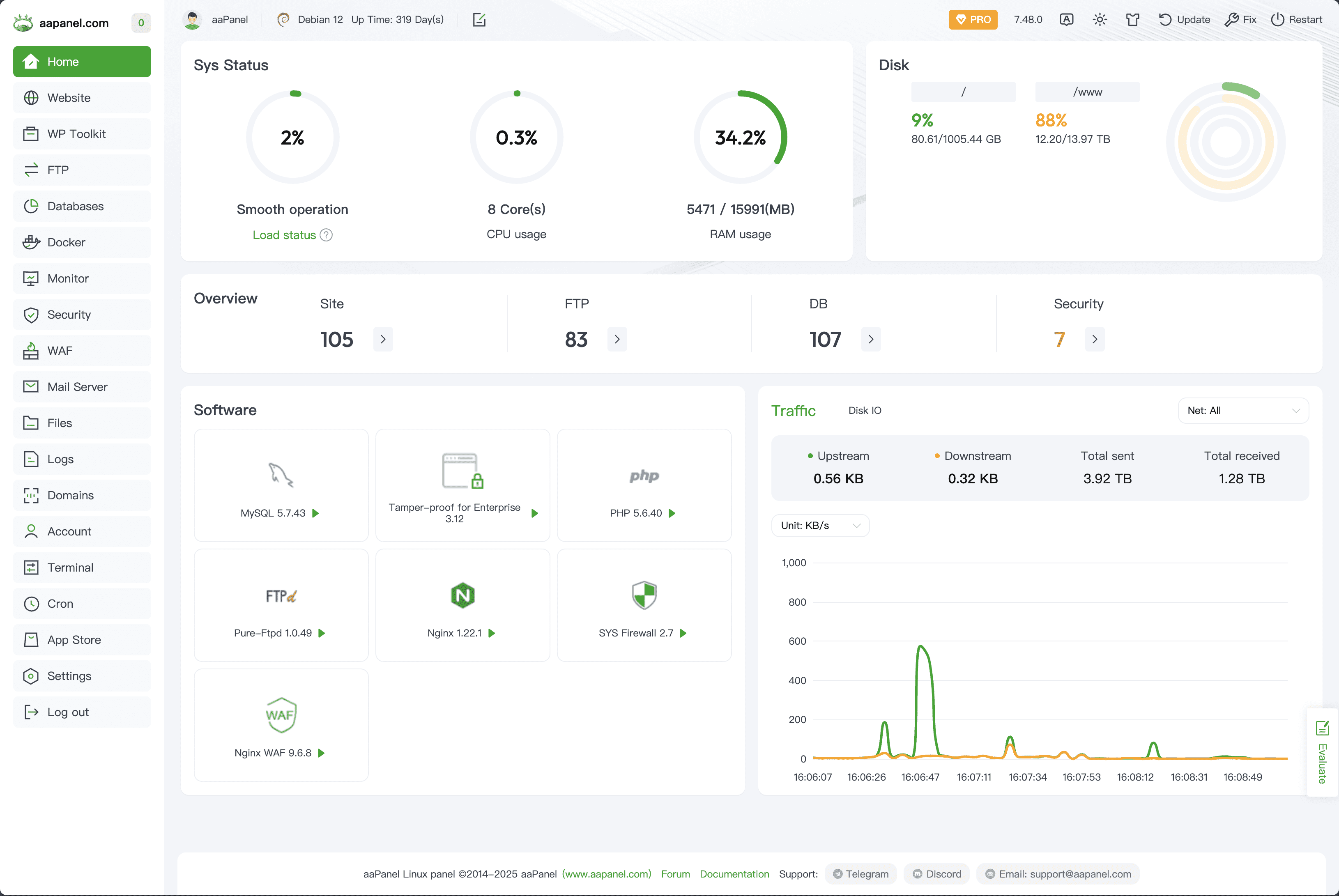
aaPanel is a simple but powerful hosting control panel, it can manage the web server through web-based GUI(Graphical User Interface).

  • one-click function: such as one-click install LNMP/LAMP developing environment and software.
  • save the time: Our main goal is helping users to save the time of deploying, thus users just focus on their own project that is fine.

Demo

Demo:https://demo.aapanel.com/fdgi87jbn/
username: aapanel
password: aapanel
image

What can I do

aaPanel is a server management software that supports the Linux system.

It can easily manage the server through the Web terminal, improving the operation and maintenance efficiency.

Installation

Make sure it is a clean operating system, and have not installed Apache /Nginx/php/MySQL from other environments aaPanel is developed based on Ubuntu 22+, it is strongly recommended to use Ubuntu 22+ linux distribution

Note, please execute the installation command with root authority

  • Memory: 512M or more, 768M or more is recommended (Pure panel for about 60M of system memory)

  • Hard disk: More than 100M available hard disk space (Pure panel for about 20M disk space)

  • System: Ubuntu 22.04 24.04, Debian 11 12, CentOS 9, Rocky/AlmaLinux 8 9, to ensure that it is a clean operating system, there is no other environment with Apache/Nginx/php/MySQL installed (the existing environment can not be installed)

aaPanel Installation Command

URL=https://www.aapanel.com/script/install_6.0_en.sh && if [ -f /usr/bin/curl ];then curl -ksSO "$URL" ;else wget --no-check-certificate -O install_6.0_en.sh "$URL";fi;bash install_6.0_en.sh 66959f96

aaPanel Docker Deployment

The docker image is officially released by aaPanel

Maintained by: aaPanel

How to use

$docker run -d -p 8886:8888 -p 22:21 -p 443:443 -p 80:80 -p 889:888 -v ~/website_data:/www/wwwroot -v ~/mysql_data:/www/server/data -v ~/vhost:/www/server/panel/vhost aapanel/aapanel:lib

Now you can access aaPanel at http://youripaddress:8886/ from your host system.

  • Default username:aapanel
  • Default password:aapanel123

Port usage analysis

  • Control Panel : 8888
  • Phpmyadmin : 888

Dir usage analysis

  • Website data : /www/wwwroot
  • Mysql data : /www/server/data
  • Vhost file : /www/server/panel/vhost

Note: after the deployment is complete, please immediately modify the user name and password in the panel settings and add the installation entry

Frequently asked questions

Is aaPanel free to use?

aaPanel is open source. There is no licence fee and no seat count — you can self-host it or, where the project offers one, pay a vendor for a managed version instead.

What does aaPanel do?

Powerful and user-friendly web hosting control panel

What is aaPanel written in?

aaPanel is primarily written in JavaScript. Its source is publicly available at https://github.com/aaPanel/aaPanel, and it has 3,058 GitHub stars.