
5ire is a free, open source ai interaction & interfaces project written in TypeScript and released under a custom open-source licence. It has 5,351 GitHub stars, 432 forks and 75 open issues, and was last pushed 4 days ago. On this registry it ranks #47 of 76 tracked projects in AI Interaction & Interfaces, with 5 head-to-head comparisons available. It gained 5 stars over the last 6 tracked days.

What is 5ire?

What it is

5ire is a cross-platform desktop AI assistant and MCP client written in TypeScript, distributed as packaged builds and hosted at 5ire.app. It lives in the AI interaction and interfaces space of the AI and machine learning ecosystem, and it works against the Model Context Protocol, the open protocol that standardizes how applications hand context to large language models. It connects to major service providers — OpenAI, Azure, Anthropic, Google, Mistral, Doubao, Grok, DeepSeek, and Ollama — so one desktop client fronts many backends.

The concrete problem it solves is fragmentation. Chat clients, retrieval pipelines, tool runtimes, and spend tracking normally live in separate applications. 5ire puts them in one desktop app: a local knowledge base for retrieval-augmented generation, tool access through MCP servers, a prompt library, bookmarks, conversation search, and API usage analytics. The repository carries the topics knowledge-base, llms, mcp, mcp-client, and model-context-protocol, and it holds 5,348 stars, 432 forks, and 75 open issues. The license is NOASSERTION, so terms need checking before reuse.

Key capabilities

  • Runs as a cross-platform desktop AI assistant and MCP client built with TypeScript.
  • Talks to OpenAI, Azure, Anthropic, Google, Mistral, Doubao, Grok, DeepSeek, and Ollama.
  • Integrates bge-m3 as a local embedding model for multilingual vectorization.
  • Parses and vectorizes docx, xlsx, pptx, pdf, txt, and csv documents, storing vectors locally to power RAG.
  • Connects tools through MCP servers, giving access to the file system, system information, databases, and remote data.
  • Tracks API usage and spending through usage analytics.
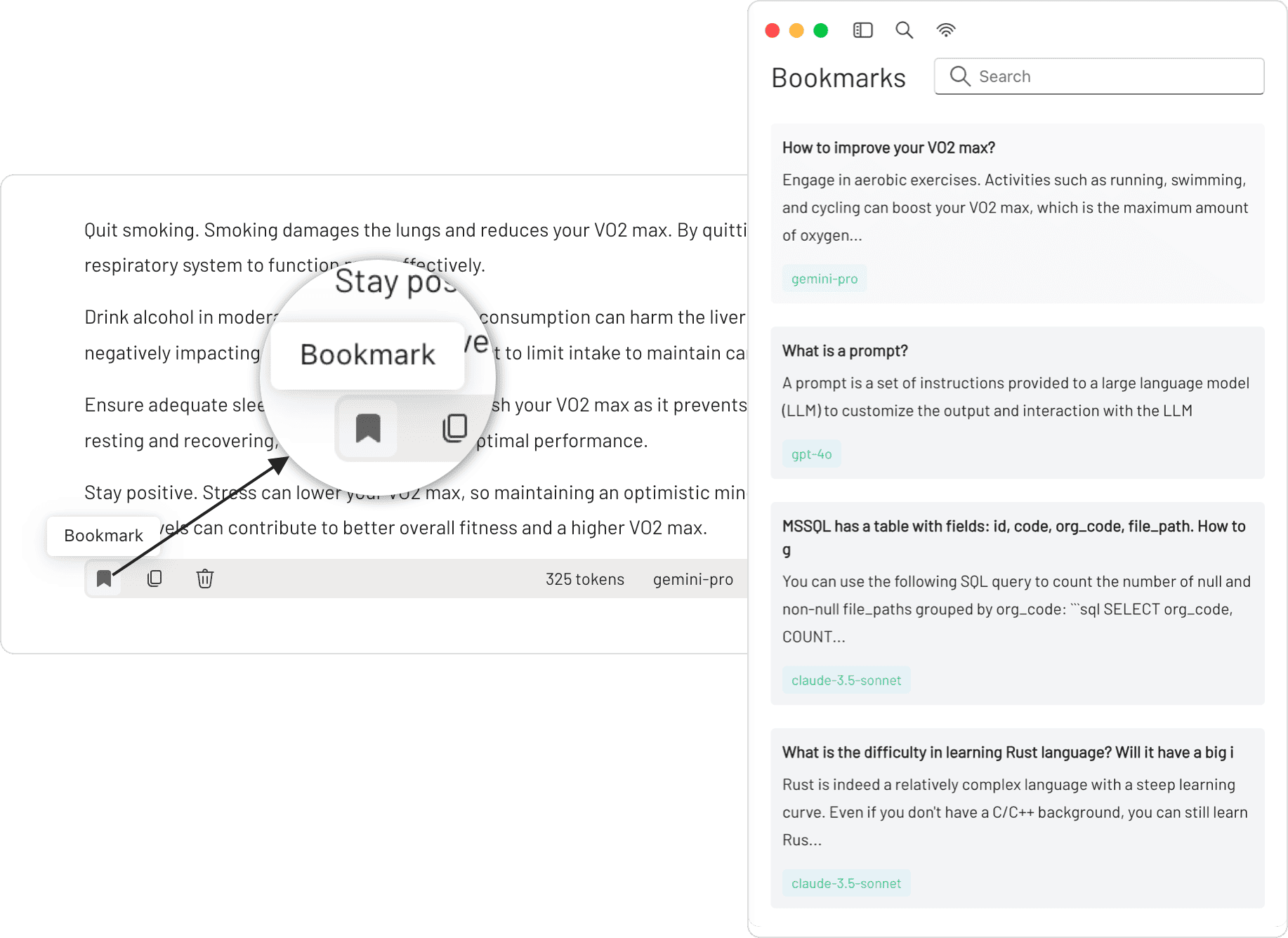
  • Provides a prompt library with variable support, conversation bookmarks that survive deletion of the original messages, and keyword quick search across all conversations.

Who uses it and how

  • Desktop users who want one client for several model providers instead of separate accounts and interfaces.
  • Teams that need local retrieval over office documents and CSVs without shipping data to a hosted vector store.
  • Developers wiring MCP servers to give a model filesystem, database, or remote data access during a chat session.
  • Publishers who list MCP servers through MCPSvr, a community-driven directory, or embed 5ire's one-click server installation using the integration guide.
  • Builders extending the app itself, following the development setup guide and the wiki.

Getting started

Builds ship through GitHub Releases and are packaged per platform because 5ire depends on native modules; macOS packaging may need APPLE_TEAM_ID, APPLE_ID, and APPLE_ID_PASS for notarization. The README points to INSTALLATION.md for install steps, and the tools feature needs Python, Node.js, and uv installed as the MCP server runtime.

When to use it — and when not to

Good fit when a desktop client must span multiple providers plus local RAG and MCP tools in one place. Self-hosters must be ready to operate the local embedding and vector storage, install the Python, Node.js, and uv runtime for tools, and package per platform themselves, since native dependencies block

project readme (upstream, from github) — read inline
Logo
(pronounced "fai-er")

A Sleek AI Assistant & MCP Client

5ire discord server follow on LinkedIn Commits last month Issues closed Verified on MseeP


OpenAI
/ Azure
/ Anthropic
/ Google
/ Mistral
/ Doubao
/ Grok
/ DeepSeek
/ Ollama

Twitter · Releases


Before to activating tools feature, ensure the following components are installed:

  • Python
  • Node.js
  • uv (Python package manager)

These components are required as they constitute the runtime environment for the MCP Server. If you don't anticipate using the tools feature immediately, you may choose to skip this installation step and complete it later when the need arises.

For detailed installation instructions, please see our Installation Guide.


💪 Getting involved

If you want to contribute code to 5ire or develop your own apps based on 5ire, start with the Development Setup Guide.

Visit Wiki for more details.

🚀 To integrate 5ire’s one-click server installation into your website, see the One-Click Server Installation Integration Guide.


💬 Community

Join the Discord, By joining, you’ll get:

  • Faster responses to your questions and issues
  • Direct input on new features and improvements
  • A place to share ideas, tips, and feedback with other 5ire users
  • Opportunities to co-build and shape the future of 5ire together

Features

⚒️ Support Tools via MCP Servers

MCP is an open protocol that standardizes how applications provide context to LLMs. Think of MCP like a USB-C port for AI applications. Just as USB-C provides a standardized way to connect your devices to various peripherals and accessories, MCP provides a standardized way to connect AI models to different data sources and tools.

With tools, you can access the file system, obtain system information, interact with databases, access remote data, and more, rather than just having a simple conversation.

https://github.com/user-attachments/assets/5aa98f2b-c26d-435e-8196-73fa414066eb

We have created an open marketplace for MCP Servers. it empowers users to discover exceptional tools while offering a streamlined process for sharing their own MCP server creations.

https://github.com/user-attachments/assets/be66c30e-bb29-4dfe-9f25-8d396470ed60

💡 Local Knowledge Base

We have integrated the bge-m3 as our local embedding model, which excels in multilingual vectorization. 5ire now supports parsing and vectorization of docx, xlsx, pptx, pdf, txt, and csv documents, enabling storage of these vectors to power robust Retrieval-Augmented Generation (RAG) capabilities locally.
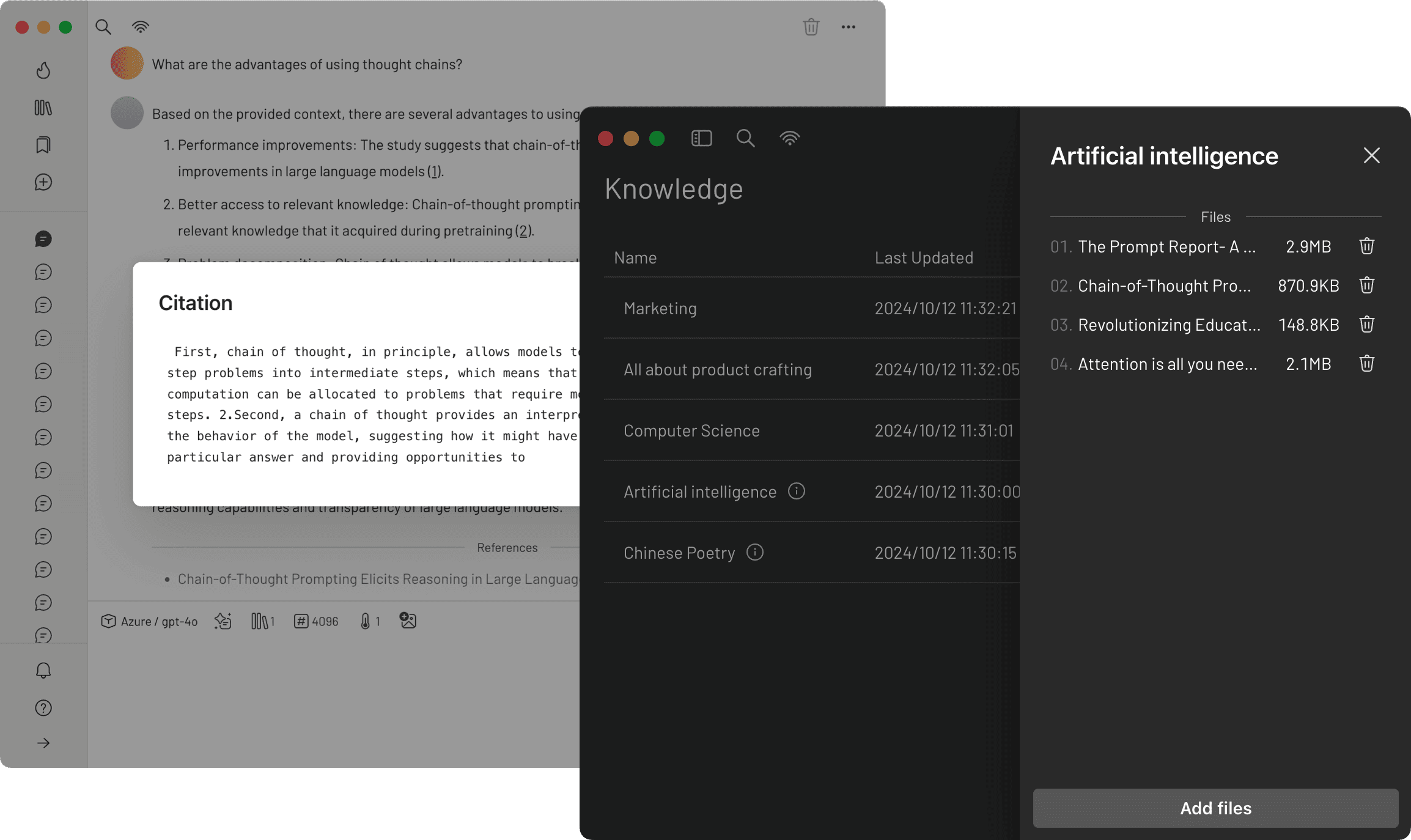
Local Knowledge Base Screenshot

📈 Usage Analytics

By keeping track of your API usage and spending, you can gain a better understanding of how much you're spending on the API and make informed decisions to optimize your use of the service.
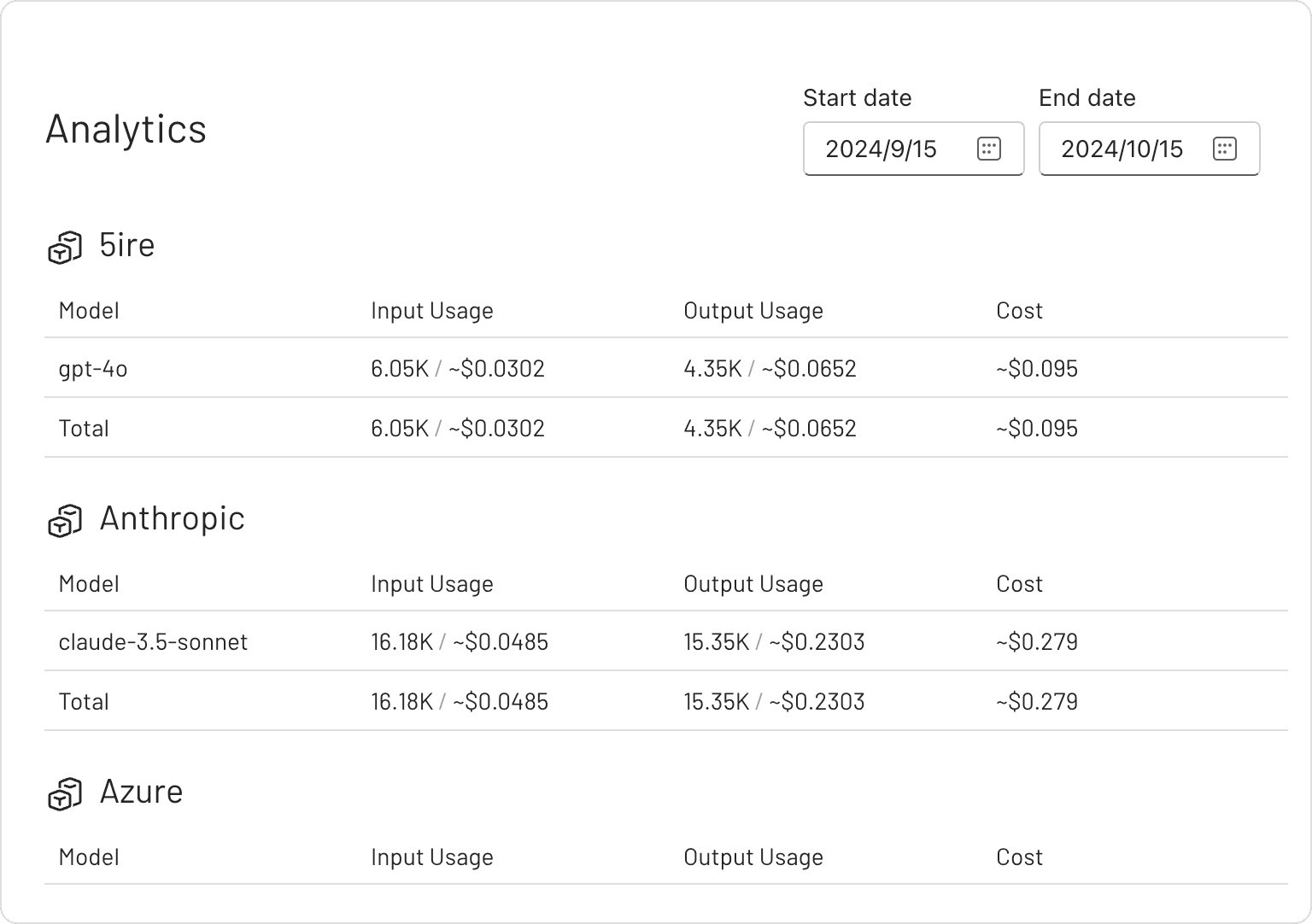
Usage Analytics Screenshot

✨ Prompts Library

The prompt library provides an effective way to create and organize your own prompts. These prompts are highly versatile, thanks to their support for variables.
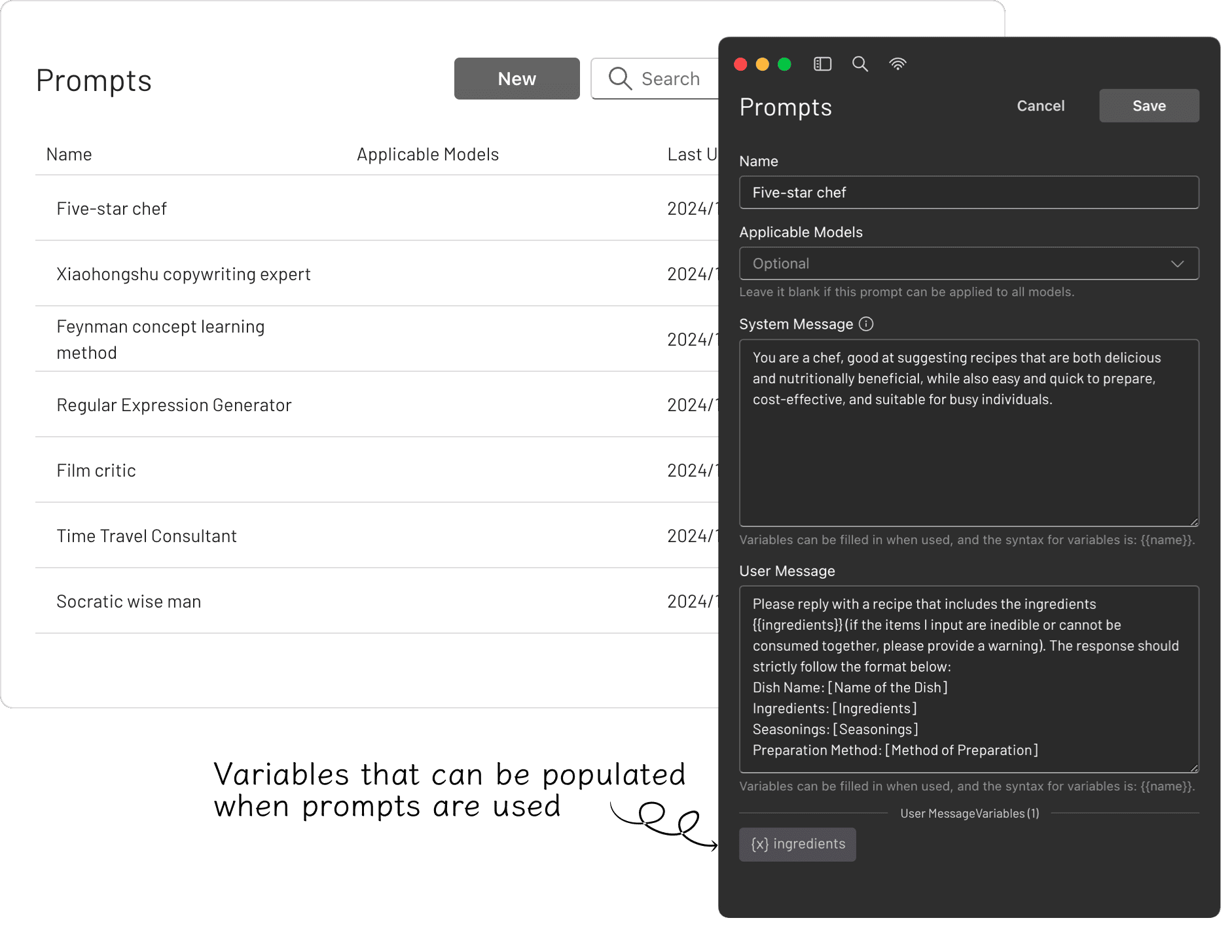
Prompts Library Screenshot

🔖 Bookmarks

You can bookmark each conversation, and even if the original messages are deleted, the saved bookmarked content remains unaffected. Bookmarks Screenshot
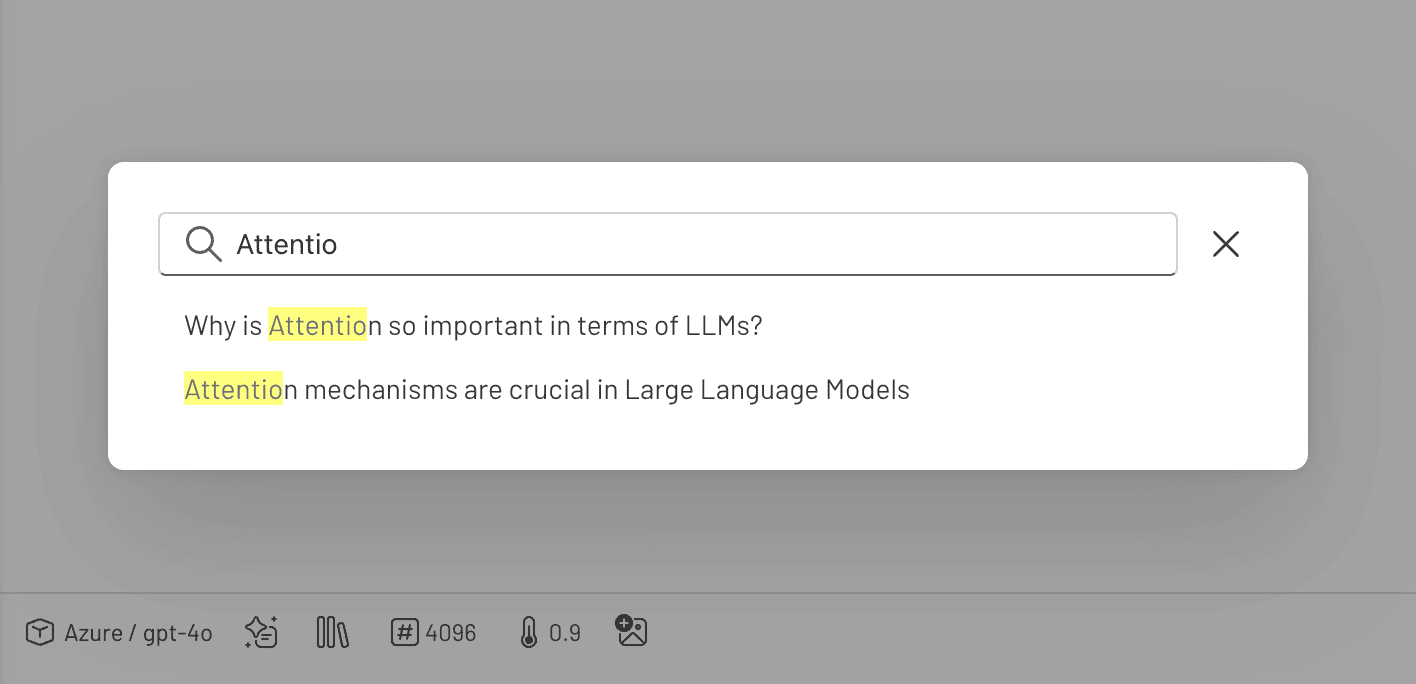
🔍 Quick Search

You can perform keyword searches across all conversations, quickly pinpointing the information you need. Search Screenshot
[!TIP] Since 5ire uses native dependencies, it needs to be packaged on the corresponding platform. If it is on Mac OS, you may also need to configure APPLE_TEAM_ID, APPLE_ID, and APPLE_ID_PASS for notarization to avoid security alerts.


Discover Exceptional MCP Servers

MCPSvr, a community-driven directory of MCP servers, empowers developers to discover exceptional tools while offering a streamlined process for sharing their own MCP server creations.

Frequently asked questions

Is 5ire free to use?

5ire is open source. There is no licence fee and no seat count — you can self-host it or, where the project offers one, pay a vendor for a managed version instead.

What does 5ire do?

Smart desktop AI assistant with powerful local knowledge features

What is 5ire written in?

5ire is primarily written in TypeScript. Its source is publicly available at https://github.com/nanbingxyz/5ire, and it has 5,351 GitHub stars.

